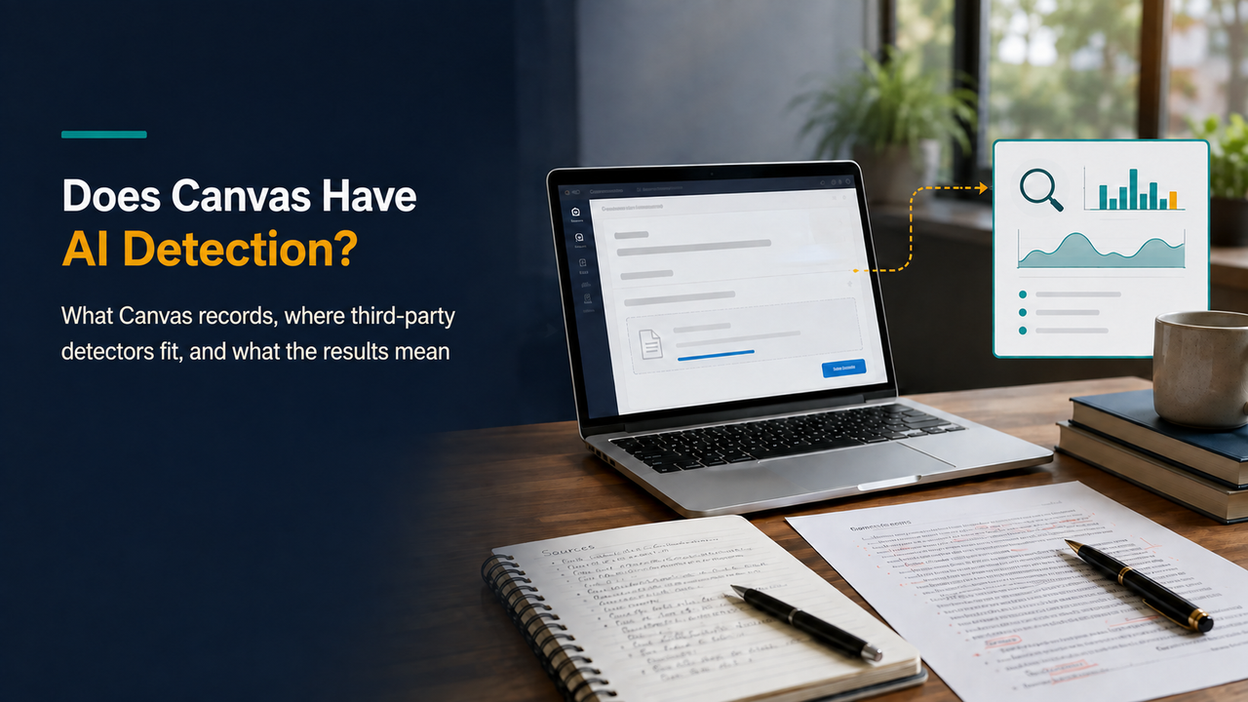
Canvas does not put a built-in AI-writing detector on every assignment. A college can connect Turnitin, Copyleaks, GPTZero or another approved service, but that service must be enabled for the institution, course or assignment before it can analyze eligible work.
This is the answer students need when an upload deadline is close: a Canvas submission alone does not tell you whether an AI detector is running, and an AI score shown in Canvas is not Canvas independently proving that ChatGPT wrote the paper. One school may surface a Turnitin report, another may run no AI analysis, and a quiz may involve separate proctoring rules. The shared logo tells you very little; the local assignment setup tells you far more.
The useful question is therefore not “Can Canvas catch me?” It is: Which service, if any, applies to this assignment; what can the instructor actually see; and what would a report establish or fail to establish? This guide answers those questions, separates reports from activity logs, and shows how students and instructors can respond without treating a probability score as proof.
Short answer: Canvas is the submission and course platform. When AI writing detection appears inside Canvas, the analysis normally comes from an institutionally configured third-party service. A detector can flag linguistic patterns in submitted text, but it cannot directly observe who wrote the work or automatically establish academic misconduct.
What matters most:
- The LMS does not apply one native AI-writing score to every submission.
- Turnitin, Copyleaks or another approved service may run inside a particular Canvas assignment.
- A similarity score and an AI-writing indicator answer different questions.
- Copy-and-paste activity, page views and quiz logs are not proof of AI authorship.
- A hidden or missing student report does not prove that instructor-side review is disabled.
- Any flag needs the marked text, assignment policy and evidence of the writing process to be reviewed together.
Publisher disclosure: Lunote provides an AI Detector and AI Humanizer. This article does not claim that either tool can predict, bypass or override an institution’s Canvas or Turnitin result; the point is to help readers inspect writing and follow the course policy before submitting.
Does Canvas Have a Built-In AI Detector?
Canvas LMS includes assignments, discussions, quizzes, grading, analytics and connections to external education tools. Instructure has also introduced native AI-assisted features for tasks such as discussion summaries, translation and course-content search. Those features use AI, but they are not the same as a system that classifies student essays as human- or AI-written. Instructure’s current AI Privacy Notice describes these AI-assisted product functions without presenting Canvas as a universal authorship detector.
An accepted response in the Instructure Community makes the operational distinction plainly: Canvas itself does not create the plagiarism or similarity score; institutions can connect third-party services that do. In other words, there is no single Canvas plagiarism checker or Canvas AI checker that operates identically for every customer. Another Canvas Community response states that Canvas does not itself provide instructors with a native AI-generated-paper detection feature and points users toward third-party integrations instead.
This does not mean an assignment submitted in Canvas is never checked. Canvas is designed to work with external applications through standards and integration frameworks. A school may license Turnitin, Copyleaks or another service, make it available in Canvas, and configure it for selected assignments. The report can then appear within the instructor’s familiar grading workflow even though the detection model belongs to the outside provider.
Who is doing the detecting: Canvas, an integration, or a proctoring tool?
| System | What it actually does | Is it AI authorship detection? | Why the distinction matters |
| Canvas LMS | Accepts work, records submissions, hosts discussions and quizzes, displays grades and supports course analytics | Not by itself | A submission in Canvas does not establish which detector, if any, analyzed it |
| Third-party similarity or AI service | Processes eligible text and returns its own report through an integration | It may be, if the institution has licensed and enabled that feature | The provider, settings, file type and assignment configuration determine the result |
| Proctoring, lockdown or monitoring tool | Restricts or records parts of an assessment environment, depending on the product and permissions | Usually not a text-authorship detector | Browser or webcam events are different evidence from an AI writing classification |
The wider Canvas ecosystem also contains AI-enabled learning tools. Seeing an “AI” feature does not mean that every piece of student writing is being scanned for AI authorship. A translation tool, teaching assistant or smart search feature has a different purpose, input and output. The institution’s tool list and the assignment’s settings matter more than the Canvas logo on the page.
How AI Detection Works Inside a Canvas Assignment
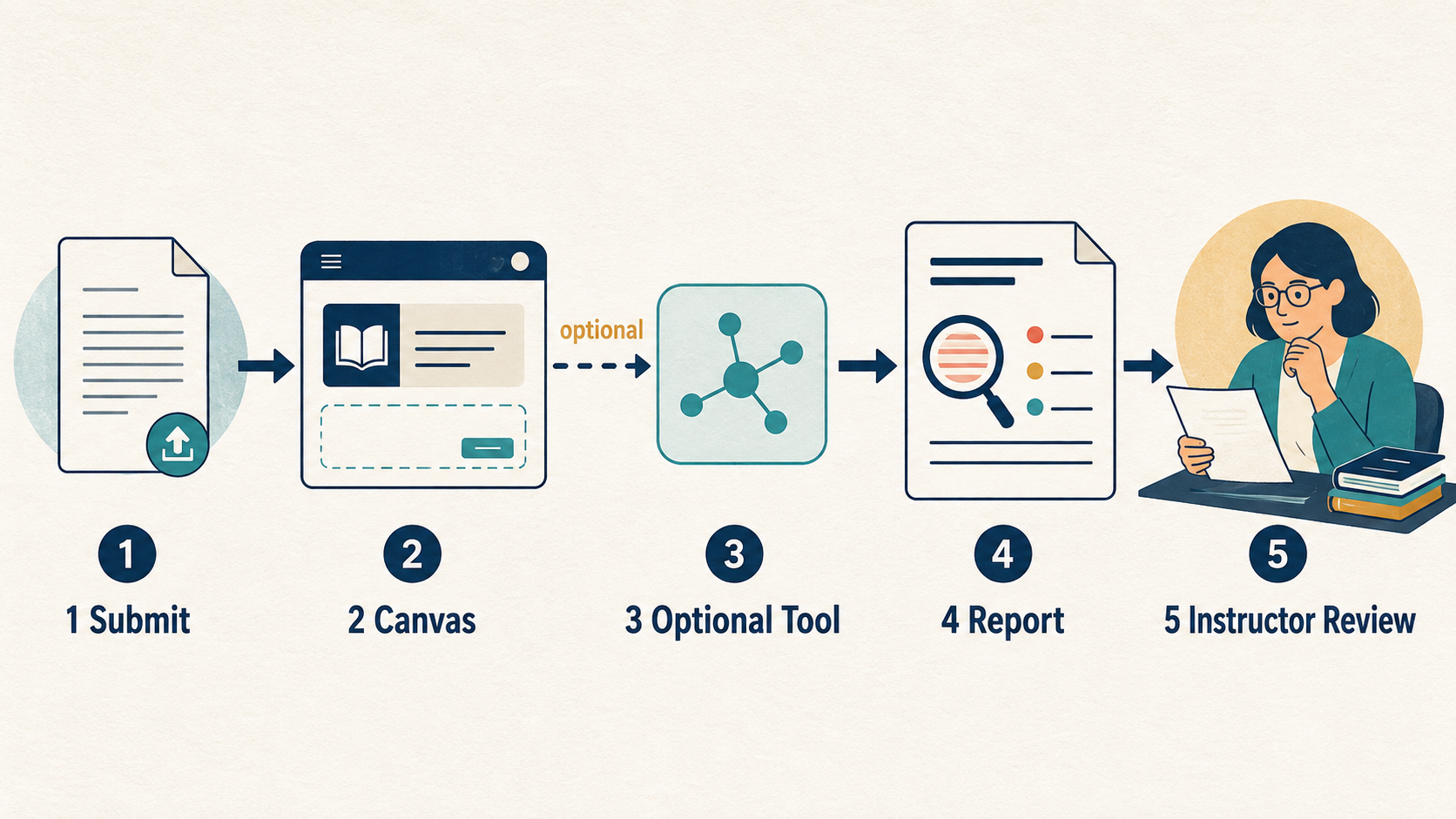
When a Canvas assignment does use AI detection, the workflow typically begins before the student submits anything. The institution must first obtain and configure a compatible service. An administrator may make it available across the institution, while an instructor may still need to select the service or relevant review settings for a particular assignment. The exact controls vary by integration and local policy.
The submission process can then look like this:
- The instructor creates an eligible assignment. The instructor selects an online submission method, such as a text entry or file upload, and configures the available plagiarism-review or external-tool option. A detector cannot meaningfully analyze a submission type it does not support.
- The student submits through Canvas. Canvas records the submission and passes the supported file or text to the configured provider. This transfer is why a third-party result can later appear within Canvas.
- The provider processes the work. A similarity system compares text with indexed sources and repositories. An AI writing model instead estimates whether qualifying passages resemble patterns associated with generated or AI-altered prose. A service may offer both reports, but they remain separate analyses.
- The result returns to the grading workflow. Depending on the integration, an instructor may open a report from Canvas or SpeedGrader. Whether students can view the same information depends on assignment, course and institution settings.
- A person interprets the report. The software produces a signal, not a disciplinary decision. An instructor or academic-integrity reviewer must consider the actual passages, assignment rules and other evidence.
Turnitin’s current Canvas workflow documentation confirms that an instructor can create an online Canvas assignment, use Turnitin through the Canvas Document Processor, configure report settings and view Similarity and AI Writing Reports. Copyleaks likewise lists Canvas among the learning management systems supported by its LMS integration. GPTZero also documents a Canvas integration that can show scans in the grading workflow. Those provider pages establish that these services can connect to Canvas. They do not establish that your school bought the feature, turned it on, or uses it for your assignment.
What AI detector does Canvas use?
There is no single answer for every Canvas installation. No detector is assigned to every customer. A university may use Turnitin, another may use Copyleaks or GPTZero, and another may retain ordinary similarity checking while offering no AI report. Departments within one institution can also follow different workflows.
That also answers the related question does Canvas use Turnitin? Canvas supports Turnitin workflows, but “supports” is not the same as “uses by default.” The institution must have the relevant arrangement and configuration. A Canvas Turnitin AI detection result is produced by Turnitin and surfaced through the connected workflow; Canvas does not independently recalculate it.
The safest wording is:
- Canvas itself: no universal native AI authorship score for every assignment.
- Turnitin in Canvas: possible when the institution licenses and configures the relevant integration and AI writing capability.
- Copyleaks in Canvas: possible when the institution configures its LMS integration.
- GPTZero in Canvas: possible where an institution has implemented its documented Canvas integration.
- Another detector: possible through an approved integration, manual instructor workflow or local system.
- No detector: also possible, even when the assignment is submitted through Canvas.
Students usually cannot identify the full institutional configuration from a generic Canvas help page. The assignment instructions, syllabus, visible review-provider label and local academic-integrity policy provide better evidence. Asking the instructor is more reliable than assuming that another university’s Reddit screenshot describes your course.
Does Canvas automatically check every upload?
No universal rule says that every file uploaded to Canvas receives an AI score. The assignment must use an enabled review workflow, the detector must accept the submitted material, and the submission must satisfy that provider’s processing requirements.
Turnitin’s current AI Writing Report guide, for example, says an eligible submission must contain at least 300 words of qualifying long-form prose, remain below 30,000 words and 100 MB, use a supported language, and arrive in an accepted file type. Poetry, code, scripts, bullet lists, tables and annotated bibliographies are not treated like ordinary long-form prose by that model. A successfully uploaded document can therefore receive a similarity report without producing a usable AI Writing Report.
The absence of a visible AI percentage has several possible explanations: the feature is not licensed, it is disabled, the student is not permitted to see it, processing is incomplete, or the content is ineligible. It should not be interpreted as a certificate that no AI was used.
AI Detection, Similarity Checking and Canvas Logs Are Different
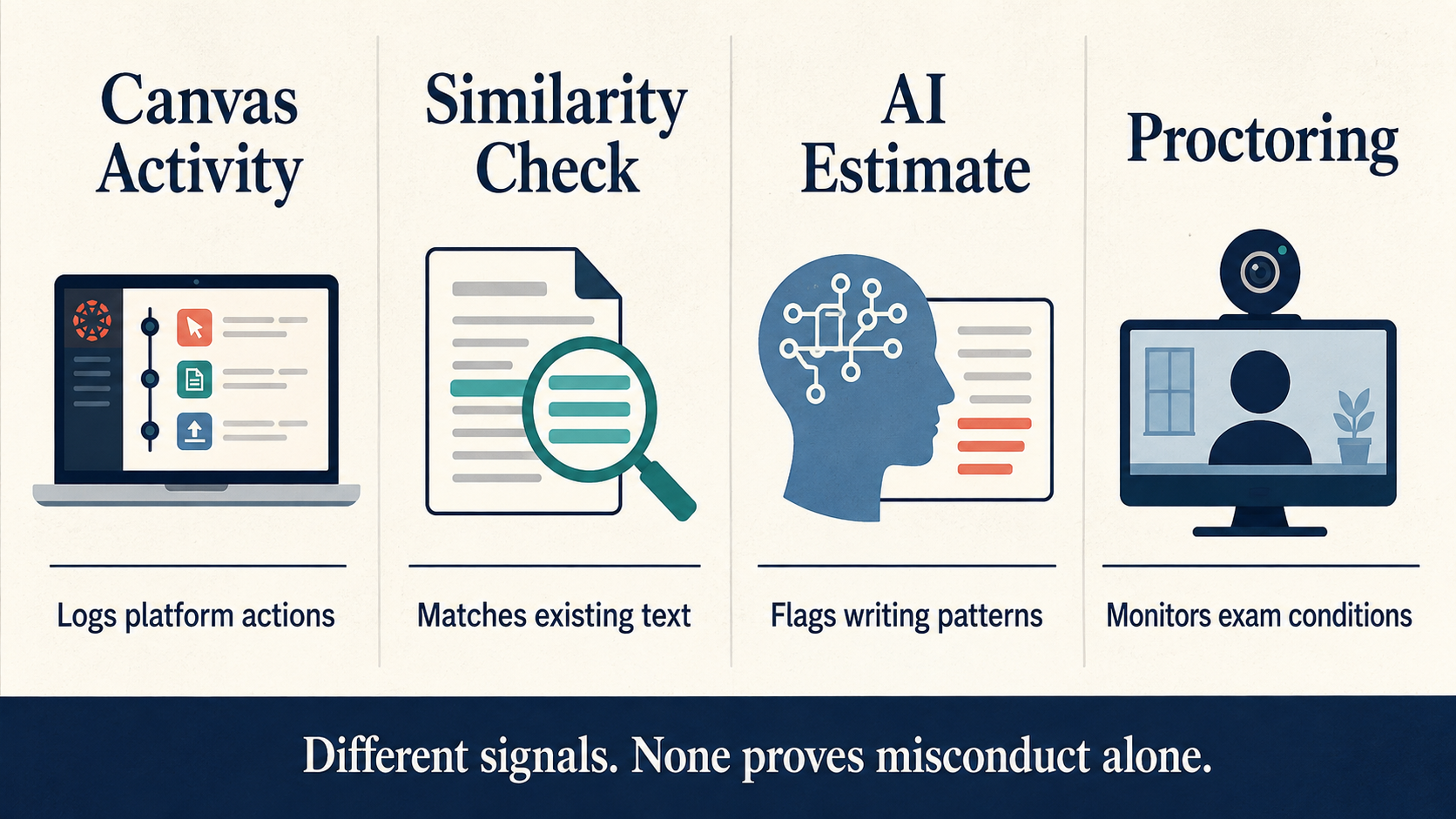
Much of the anxiety around this query comes from combining several unrelated signals. A student hears that Canvas can see when a quiz page loses focus, learns that Turnitin can display an AI indicator, and concludes that Canvas watched them copy a ChatGPT answer. That conclusion does not follow from the available data.
Each system answers a narrower question:
| Signal | What it can show | What it cannot establish by itself |
| Submission record | File, text, submission time, attempt and related assignment data | Who composed every sentence or which outside tools were used |
| Similarity report | Text that matches indexed web pages, publications or submission repositories | Whether matched text is properly quoted, plagiarized or AI-generated |
| AI writing report | Passages a provider’s model classifies as likely AI-generated or AI-altered | Direct observation of ChatGPT use, the writer’s identity or misconduct |
| Page views and participation analytics | Requests and course actions recorded by Canvas | A complete reconstruction of everything a student did on a device |
| Quiz log | Events associated with a quiz attempt, which may include viewing and response timing depending on quiz version and settings | Why a page lost focus or whether an answer came from AI |
| Copy-and-paste behavior | Usually no universal native Canvas proof of the source of pasted text; additional tools or custom code may behave differently | That pasted material is dishonest or AI-generated |
| Screenshot activity | Canvas alone should not be assumed to provide a universal screenshot alert | What was captured or why, unless a separate monitored environment records it |
| External proctoring data | Whatever that specific service is configured and permitted to record | A universal Canvas capability or an automatic AI-authorship verdict |
AI score and similarity score do not measure the same thing
A similarity score reports how much submitted text matches material found in the comparison databases. Turnitin explicitly says that it does not itself determine plagiarism: quoted and correctly cited material may still match, while a low score does not prove that the work followed every integrity rule. The Turnitin student guide advises readers to examine the actual matches rather than treating one percentage as a verdict.
An AI writing percentage uses a different model and a different denominator. Turnitin describes it as the share of qualifying text that its model judges likely to be AI-generated or AI-generated and then altered with an AI paraphrasing process. It is not necessarily the percentage of the whole document, and it is not a probability that a student cheated.
Consider an essay containing a title page, quotations, tables, references and 1,000 words of prose. If only the prose qualifies for AI analysis, an AI percentage refers to that eligible portion, not automatically to every word in the uploaded file. A similarity score may include a different set of matches. Placing the two numbers side by side does not make them interchangeable.
What does Turnitin’s asterisk mean?
Turnitin says false positives occur more often in the 1%–19% range. Its current report therefore shows an asterisk rather than a numerical score or passage highlights for results above 0% but below 20%. This design choice is meant to reduce overinterpretation of low scores.
The rule does not mean that 19% is “safe,” that 20% proves AI use, or that students should edit until they fall below a threshold. It describes how Turnitin displays a less reliable range. The company also states that its model can misidentify human, AI-generated and AI-paraphrased writing and that the report should not be the sole basis for adverse action against a student.
Can Canvas see if you copy and paste?
For an ordinary Canvas text entry, students should not assume that the platform gives every instructor a universal keystroke-by-keystroke recording or a reliable label saying “this paragraph came from ChatGPT.” In an Instructure Community discussion about disabling copy and paste, the accepted response explains that Canvas has no built-in way to do so and that account-level custom JavaScript would be a separate local modification. That source is archived, so it establishes only the historical product boundary, not what every institution’s current add-ons can record.
A paste also has many legitimate explanations. A student may draft in Microsoft Word or Google Docs, use accessibility software, move a quotation from research notes, or paste a bibliography. Even if an additional tool records a paste event, the event does not reveal authorship. The content, citation and assignment policy still need review.
Quiz conditions require separate treatment. Logs can record events around an attempt, and some versions or settings may indicate that the quiz page stopped being viewed and later resumed. That event does not identify what appeared in another tab, explain why focus changed, or classify the response as AI-generated. The official Canvas Basics Guide warns that page-view data is based on server requests and should be treated as an approximation of activity rather than an absolute record.
Can Canvas see screenshots or tab switching?
Canvas should not be described as a universal screenshot detector. A school may require separate proctoring software, a lockdown browser such as respondus lockdown browser, a managed device or another monitoring product for an assessment. Those tools have their own disclosures, permissions and limits. Their presence should be stated in the exam instructions or institutional policy.
Likewise, a quiz log may record that the Canvas quiz-taking page stopped being viewed; that is not the same as seeing the contents of another tab. A lost internet connection, notification, accessibility action or accidental navigation can produce an event that needs context. Treating it as automatic proof of cheating confuses an activity timestamp with an explanation.
Do Canvas discussion posts check for AI?
There is no universal AI scan for every Canvas discussion post. The standard assignment-based plagiarism-review workflow should not be assumed to scan every discussion reply automatically. A teacher could review text manually or use an approved external detector, and some institutions may use browser extensions to review discussion-post text or inline content outside the standard assignment submission workflow. Another course may not scan discussions at all.
Discussion posts are also often short, conversational and full of quotations or replies. Those characteristics can fall outside the conditions under which a detector performs best. A short output or no visible score should not be treated as proof either way.
How to Check Whether Your Canvas Assignment Uses AI Detection
No checklist can reveal settings that your institution deliberately keeps on the instructor side, but students can gather much better evidence than a generic internet answer.
1. Read the assignment instructions and syllabus before submitting
Look for sections called Plagiarism Review, Originality, Turnitin, Copyleaks, External Tool, Academic Integrity or Generative AI. The important language may describe permitted AI assistance rather than the detector itself. For example, an instructor may allow brainstorming but require disclosure, or permit grammar help while prohibiting generated analysis.
Do not infer permission from silence. If the assignment rules are unclear, ask a narrow question: “May I use an AI tool to brainstorm an outline or edit grammar, and what disclosure do you require?” That produces a more useful answer than asking whether Canvas can catch it.
2. Inspect the assignment’s submission information
Some Canvas configurations identify a plagiarism-review provider or external tool on the assignment page. A Turnitin or Copyleaks label shows that a service is connected to the workflow, but it may not reveal every feature available to the instructor. Similarity checking can be active even when AI writing detection is unavailable or disabled.
Record the assignment instructions as they existed when you submitted. Policies can be updated, and a screenshot or downloaded syllabus helps everyone discuss the same wording later.
3. Review the post-submission screen without overreading it
A colored icon, similarity percentage or report link may appear after processing. Open the underlying report when access is allowed, such as a turnitin similarity report. Identify whether the number refers to similarity or AI writing; a visible percentage score may reflect similarity or another provider metric and should not be interpreted from the color alone without opening the report.
If no report is visible, several explanations remain possible. The instructor may have hidden student access, processing may still be underway, or the content may not meet the detector’s requirements. Turnitin’s March 2026 Canvas workflow guide says students can view available reports from Grades or Assignments when student access was enabled during assignment creation. This makes report visibility a setting, not reliable evidence that no instructor-side report exists. Turnitin also notes that some resubmitted similarity reports can take additional time.
4. Check your institution’s own help center
Institutional pages are often more useful than general Canvas articles because they describe the licensed tools and local policy. Search the school domain for Canvas Turnitin, Canvas Copyleaks, AI writing detection, academic integrity and generative AI policy. Confirm the update date and whether the page applies to students, instructors or administrators.
One university’s configuration is not evidence for another. Even within the same university, pilot programs and departmental exceptions may exist.
5. Ask the person who can answer the local question
An instructor can explain the assignment policy. The teaching and learning, academic technology or Canvas administration team can explain institution-wide integrations. A student conduct office can explain what evidence and appeal process apply if a concern is raised.
This final step matters because a detector’s presence is only part of the issue. What matters to the student is which uses of AI are allowed, how disclosure works and how a report will be reviewed.
How Much Should Anyone Trust a Canvas AI Detection Result?
An AI detector analyzes the submitted artifact, not the full act of writing. It does not watch an idea develop, verify a research notebook, know whether a sentence was dictated through accessibility software, or determine which revisions came from a human editor. Its output can contribute to a review, but it cannot recover those missing facts from linguistic patterns alone.
Turnitin’s own limitation language is unusually important here: its model may misidentify text and should not be used as the sole basis for an adverse action. That warning should guide both students and instructors. A polished report interface does not convert an estimate into direct evidence.
False positives and non-native English writing
Formal academic prose often uses conventional transitions, restrained vocabulary and predictable structures. Those features may overlap with patterns that some detectors associate with generated text. Writers using English as an additional language, including non native english speakers, may also use more regular sentence structures without using AI.
A Stanford-led study summarized by Stanford HAI tested seven detectors and found that 61.22% of human-written TOEFL essays were classified as AI-generated. At least one detector flagged 89 of the 91 essays. The study is evidence of a serious failure mode, not a current accuracy test of every Turnitin or Copyleaks version. False positives are common, especially for ESL students, and competitors and institutional guidance often raise the same concern. Copyleaks has also been cited as carrying a high false positive rate for ESL students, so that risk should be checked rather than assumed away. It should make institutions test for disparate errors and require corroborating evidence rather than assume all detector percentages mean the same thing.
False negatives matter too
AI-generated text can also pass undetected, particularly after substantial human revision or when the model, language or genre differs from a detector’s training and evaluation data. This means a low score does not authenticate authorship. A system that misses AI text and another that flags human text can both produce confident-looking outputs.
Running the same essay through several public detectors does not solve the problem automatically. Their models, thresholds and labels differ, so averaging their percentages has no clear statistical meaning. Disagreement should trigger closer reading and process review, not a vote. The same caution applies when someone tries to use a public checker to predict the AI detector in Turnitin within Canvas: there is no dependable score conversion between unrelated models.
Writers can use the Lunote AI Detector as one preliminary view of passages that may read as highly patterned. The useful next step is to inspect clarity, evidence and voice. It is not to treat Lunote, Turnitin or any other detector as a certificate of human authorship.
A responsible interpretation framework
When a report raises concern, ask four questions in order:
- What exactly was analyzed? Confirm the file, text length, language, excluded ai generated content and report type.
- What exactly does the output mean? Read the provider’s definition rather than translating a percentage into “chance of cheating.”
- What other explanations fit the flagged passage? Consider quotations, templates, technical language, collaborative editing, accessibility ai detection tools and non-native English.
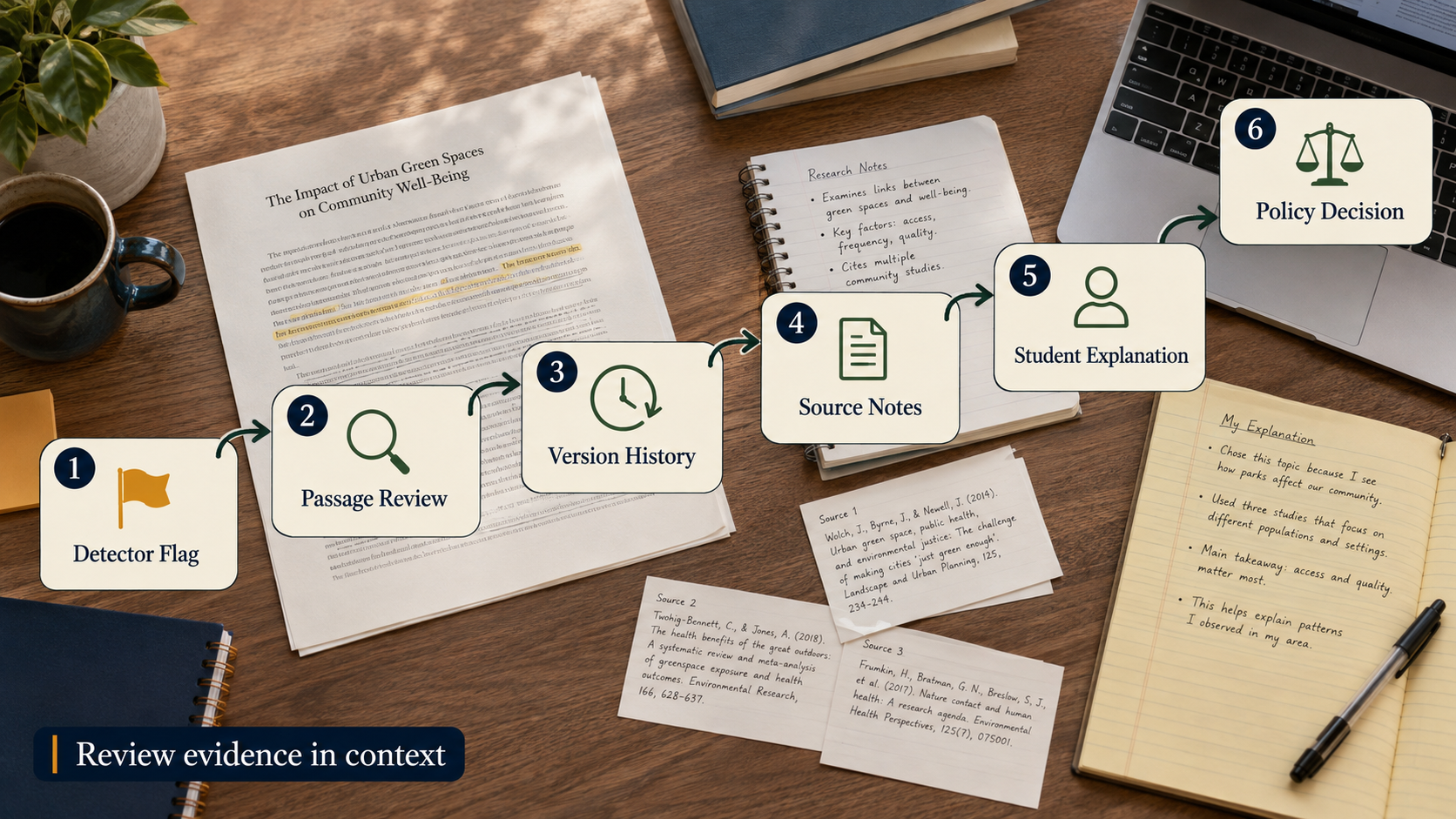
- What independent evidence exists? Review drafts, source notes, version history, prior work, oral explanation and the assignment’s disclosure rules.
This method is slower than accepting a score, but the consequence of a false accusation makes the extra review necessary.
What to Do If a Canvas Submission Is Flagged
The right response is to preserve evidence and clarify the process. Randomly rewriting the paper until a public detector displays a lower number can damage the work, erase useful history and still fail to predict the institutional tool.
For students: protect the record of how you wrote
- Save the exact submitted version and the complete report. Do not rely on a percentage copied into an email. Ask which service produced the result and request the highlighted passages or report view available under policy.
- Preserve drafts rather than overwriting them. Keep outlines, research notes, downloaded sources, citation-manager records, local file timestamps and cloud version history. A sequence of imperfect drafts can show the development that a detector cannot observe.
- Map disputed passages to your sources and reasoning. Be ready to explain why a paragraph is structured as it is, where a claim came from and how you chose the evidence. Correct missing citations, but do not fabricate notes after the fact.
- Review the course AI policy. Separate permitted assistance from prohibited substitution. If you used AI within the rules, document the tool, purpose, prompts or changes to the extent required. If the policy was unclear, identify the wording that created the ambiguity. Be cautious of services marketed to bypass detection: tools such as Tenorshare AI Bypass claim to humanize AI-generated text, but using them to evade detection software or conceal prohibited assistance can violate course rules.
- Request human review through the stated process. Explain your writing process calmly and provide relevant evidence. Ask how the detector result was weighed and what appeal route exists. Avoid claiming that another detector’s “human” score automatically cancels the first report.
Google Docs version history can preserve useful evidence, but it is not magical proof. Large pasted blocks, shared documents and editing gaps still need context. Its value comes from showing a plausible progression alongside notes, sources and the student’s ability to explain the argument.
If your concern is that genuine writing sounds stiff or generic, the Lunote AI Humanizer can be used as an editing aid only where the course permits it. Compare every revision with the source draft, restore technical terms and citations, and disclose AI-assisted rewriting when required. Never use a rewriting tool to conceal prohibited assistance or promise a particular Turnitin outcome.
For instructors: investigate the work, not just the score
Start with the report’s marked text. Check whether the model analyzed enough qualifying prose and whether quotations, references, templates or assignment language affected the result. Compare the passage with the student’s earlier work, but allow for legitimate improvement, tutoring, disability accommodations and editorial help.
A neutral conversation is often more informative than an accusation. Ask the student to explain the argument, define a key term, locate a source and describe one revision they made. Process questions test understanding without assuming guilt.
Before imposing consequences, follow institutional policy and document the evidence beyond the detector. Turnitin’s warning against sole-source use is especially relevant when a score is near a display threshold, the text is short, or the writer uses English as an additional language.
For future assignments, reduce ambiguity before trying to increase surveillance to help prevent cheating. State:
- which forms of generative AI assistance are permitted;
- whether brainstorming, translation, grammar correction or feedback are treated differently;
- what disclosure or citation is required;
- which stages of work students should preserve;
- how detector results will be reviewed;
- what opportunity students have to explain or appeal.
Process-based assignments can also ask for an outline, source annotation, draft reflection or brief oral explanation so students can demonstrate their own work. These components support learning and create better authorship evidence than a detector score alone, and assignment design should also reduce academic dishonesty and promote critical thinking and genuine understanding rather than relying on detectors as the first line of defense.
Using AI Responsibly Before Submitting Through Canvas
The permitted use of AI is defined by the course and institution, not by whether a detector notices it. One instructor may encourage AI-supported brainstorming, another may allow only proofreading, and another may prohibit generative assistance for a specific assessment. Read the policy before choosing a tool and use ai tools responsibly.
Where AI assistance is allowed, keep the student’s intellectual work visible:
- begin with your own question, notes and sources;
- verify every factual claim and citation;
- distinguish feedback from generated replacement text;
- keep drafts and record meaningful changes;
- disclose the tool and purpose when required;
- use ai tools only for permitted purposes and make sure you can explain and defend the final argument as your own work.
Lunote can support parts of that review workflow. Use the AI Detector to identify passages worth rereading, the text translator when translation is permitted and checked, or the broader Lunote workspace to work with documents. In practice, ai tools responsibly means verifying outputs, preserving personal reasoning, and avoiding undisclosed replacement text. None of these tools can override a course policy or guarantee how another detector will classify the result.
The strongest protection for genuine work is not a “0% AI” screenshot. It is a defensible process: original notes, accurate sources, meaningful drafts, transparent assistance and a writer who understands the submitted work, and institutions often treat misuse of AI much like traditional plagiarism when it misrepresents authorship. Lunote’s article on evaluating ZeroGPT accuracy reaches the same broader lesson from a different angle: detector performance changes across datasets, and a score should direct review rather than replace it.
Frequently Asked Questions
Does Canvas automatically detect AI writing?
No. As a learning management system, Canvas does not natively perform AI detection and instead relies on third party tools when a school enables them. A school can integrate services such as Turnitin or Copyleaks, and an instructor may enable the available review workflow for a specific assignment. The answer therefore depends on local licensing and settings.
Can Canvas detect ChatGPT?
Opening ChatGPT on another site is not something Canvas itself directly observes. A connected AI writing detector may classify submitted prose as resembling AI-generated text, but that is a probabilistic analysis of the final document, not direct evidence that ChatGPT was used.
What AI checker does Canvas use?
No mandatory checker is shared by all Canvas institutions. Turnitin and Copyleaks are examples of integrated tools and plagiarism checkers that some schools use with Canvas to analyze academic papers and other long-form student submissions. Your school may use one of them, another service or no AI detector, and whether canvas detect ai results appear depends on the connected provider rather than Canvas itself. Check the assignment and institutional documentation.
Can Canvas detect copy and paste?
Canvas should not be described as universally giving instructors a complete record of every pasted passage and its source. Institutions may add external tools, custom code or monitored assessment systems. Even when a paste event is available, it does not prove AI authorship; students legitimately paste work drafted in word processors, quotations and references.
Does Canvas check discussion posts for AI?
Not automatically across every Canvas course. An institution or instructor may use a third-party detector or separate review process, but another course may not. Short discussion posts may also fall outside a detector’s preferred long-form input conditions.
Can students see the Turnitin AI score in Canvas?
Visibility depends on the Turnitin integration, licensed capabilities and assignment settings. Turnitin’s current Canvas Document Processor guide says students can open available reports from Grades or Assignments when the instructor enabled student access. That does not mean every student sees every instructor-side indicator. Ask the instructor or local Canvas support team which report is available under the institution’s configuration.
Does a high AI score prove cheating?
No. Turnitin states that its AI model can misidentify text and should not be the sole basis for adverse action. The report must be considered with the marked passages, drafts, sources, version history, student explanation and the course’s academic-integrity policy.
Final Answer
So, does Canvas have AI detection? Canvas does not impose one native AI detector on every assignment, but institutions can connect AI-detection services that analyze eligible submissions and return reports inside the Canvas workflow. That is why the answer changes between schools, courses and assignments.
Students should check the specific assignment and policy rather than rely on another institution’s experience. Instructors should separate similarity, AI classification and activity logs, then use any automated flag as the start of a careful review. Neither a Canvas event nor a detector percentage can reconstruct authorship on its own.
Final Thought
So, does Canvas have AI detection? Canvas does not impose one native AI detector on every assignment, but institutions can connect powerful third-party tools that analyze eligible student work and return reports inside the Canvas workflow. That is why the answer changes between schools, courses and assignments.
Canvas plagiarism detection, when it is enabled, is also not the same thing as AI detection. Plagiarism detection looks for overlap between written work and sources in its comparison collection, while modern detectors estimate whether qualifying prose resembles patterns associated with large language models or AI-altered text. Both can raise red flags; neither can reconstruct authorship from a final research paper, a submission time, a quiz event or a percentage alone. Massive datasets can make matching and pattern analysis useful, but they do not turn a software result into firsthand knowledge of how a student wrote.
Students should check the specific assignment and policy rather than rely on another institution’s experience. Before they submit, students should prepare by keeping notes, drafts, source records and the context for any permitted AI assistance. That record matters when a quotation was properly cited, when a course has time limits, or when the policy may require students to disclose which tools they used. Instructors, meanwhile, should use any automated result as the start of a careful review, not as a shortcut meant to prevent students from explaining their process. The fair standard is straightforward: identify which system produced the signal, examine what it actually measured, and compare it with evidence of the writing process before reaching a conclusion.