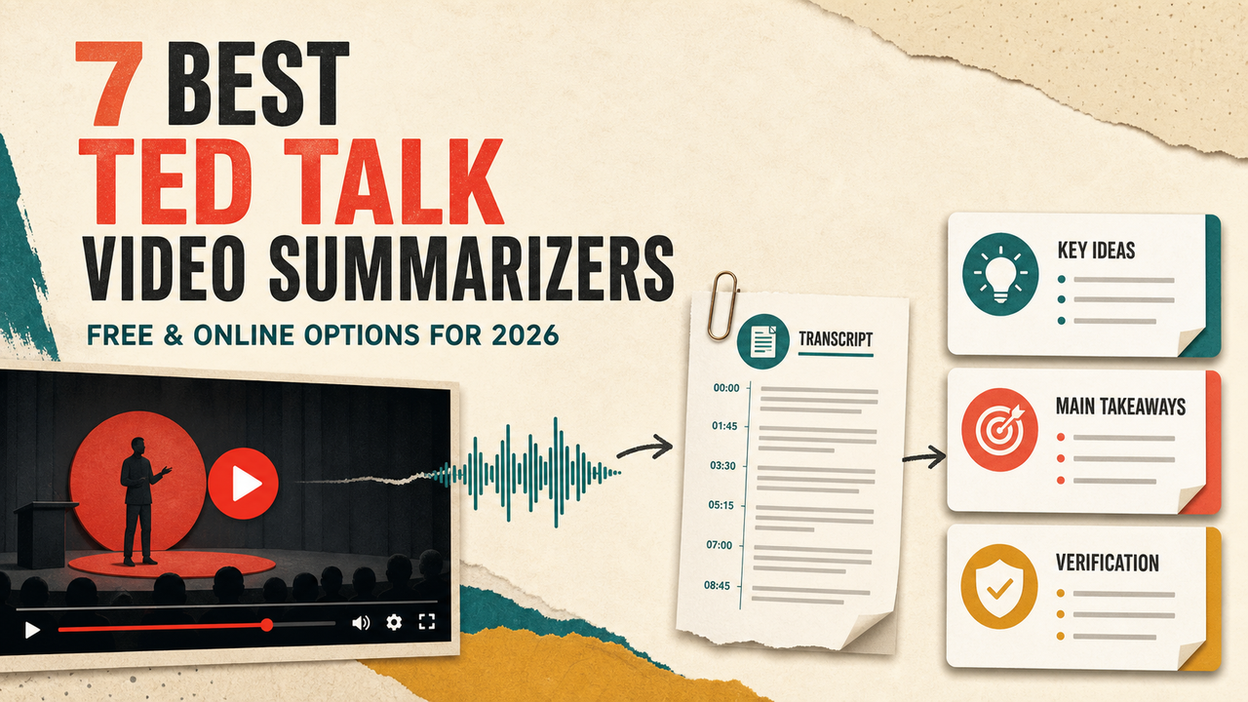
You have a 15-minute TED Talk, an assignment due tomorrow, and no useful notes. A TED Talk video summarizer can give you the central idea quickly—but the best tools do more than shorten a transcript. They preserve the speaker’s argument, connect key points to timestamps, and let you return to the original video when a number, quotation, or qualification matters.
My best overall recommendation is Lunote for people who want one direct workflow from a YouTube TED Talk to a downloadable transcript, timestamped summary, and reusable notes. NoteGPT is the strongest free, online, no-sign-up alternative I could inspect for turning one TED Talk into a transcript, structured notes, a mind map, and study materials. Decopy is another useful anonymous option with multiple output formats, while Glasp is better for readers who want timestamped highlights alongside YouTube.
This article is published by Lunote, and Lunote is included in the ranking. I have not treated that relationship as independent proof that it is the best tool for every reader. I reviewed the current interfaces, supported inputs, output controls, download options, published limits, and pricing. Where I could inspect a workflow but not produce a complete anonymous output, I say so instead of inventing a successful test.
Best TED Talk Summarizers at a Glance
| Tool | Best for | TED/YouTube input | Transcript and timestamps | Free access | Current paid entry | Main limitation |
| Lunote | YouTube TED summaries, downloadable transcripts, and reusable notes | Public YouTube link or keyword search | Timestamped transcript and takeaways; TXT transcript export | Yes | Pricing page displays annual Pro at $99.99/year and a monthly Pro renewal at $29.99/month | A TED.com page that is not backed by a public YouTube video may require a different input route |
| NoteGPT | Free no-login TED summaries and study materials | YouTube link; video/audio and other files are separate options | Timestamped transcript, structured summary, mind map, chat, slides, quiz, and flashcards | Yes; a single YouTube TED test produced a viewable result without registration | Pro $9/month billed annually or $9.99 monthly | Some advanced or caption-free processing uses paid capacity; output is extensive but still needs source checks |
| Decopy | Anonymous summaries in several formats | Public YouTube link | Transcript, timestamped summary, bullets, mind map, FAQ; TXT/PDF or copy advertised | Yes; no login advertised, up to 50 videos/day | The public tool is positioned as free | Its “100% free” and accuracy statements are provider claims; long or caption-poor videos may behave differently |
| Glasp | Timestamped reading, highlights, and transcript export | Public YouTube link on the web or through an extension | Transcript and summary with timestamps; TXT, SRT, and Markdown transcript export | Yes; summary, transcript, and chat can work without an account; 3 summaries/day stated | Paid plans raise monthly limits | Saving highlights requires an account, and audio transcription for caption-free videos has a 30-minute free monthly cap |
| Summarize.ing | The simplest paste-and-submit overview | Public YouTube link | Takeaways, segmented summary, highlights, concepts, FAQs, and mind map advertised | Standard use advertised as free; input is visible before sign-in | Premium plans are described as future/power-user options | Public limits and export controls are less explicit than those of NoteGPT or Glasp |
| WayinVideo | Source-linked notes, mind maps, and follow-up questions | TED/YouTube/Vimeo link, Google Drive, or video upload | Transcript, speaker labels, timestamps, quotes, and Q&A | Registration credits; 200 welcome credits advertised | Standard $13.99 monthly or $4.99/month billed annually | Not a true no-sign-up workflow; long talks consume credits by the minute |
| Notta | Editable transcript-first research | YouTube link or uploaded audio/video | Timestamps, speaker identification, transcript editing, AI summaries | 120 minutes/month, but only 3 minutes per conversation | Pro raises recordings to five hours and 1,800 minutes/month | The free per-recording cap is too short for a normal TED Talk |
Pricing and limits change. Check the linked provider page and the final checkout screen before subscribing. “Free” can mean a public input box, a limited daily allowance, registration credits, or an output that cannot be fully exported.
How I Evaluated the Tools
A TED Talk is not just a long paragraph spoken aloud. A good talk usually moves through a personal story, a central claim, supporting evidence, a shift in perspective, and a final takeaway. A weak AI summary may list the topics while losing the reason those topics belong together.
I therefore evaluated each tool around three representative TED-style jobs:
- A short talk of about 10 minutes: Can the tool identify the central message without turning the opening story into the main conclusion?
- A standard 15–20 minute TED Talk: Does the summary preserve the beginning, middle, and final takeaway rather than over-weighting the first few transcript paragraphs?
- A longer TEDx or conference video: Can the workflow accept the source, avoid truncation, and provide timestamps or a transcript for checking omissions?
For each workflow, I looked for six things:
| Criterion | What I looked for | Why it matters |
| Core-message capture | A clear statement of what the speaker is arguing | A list of topics is not a summary of the argument |
| Evidence retention | Examples, research, named concepts, and important numbers | These details explain why the conclusion is credible |
| Source verification | Timestamps, transcript, quotations, or links back to the video | You should not have to trust a detached AI sentence |
| Long-video coverage | Evidence that the end of the talk was processed | Transcript-based systems sometimes over-compress or truncate long inputs |
| Useful output | Notes, outline, mind map, export, translation, or Q&A | The best format depends on whether you are studying, researching, or screening videos |
| Real access cost | Sign-up, card requirement, daily cap, recording limit, and export restriction | A nominally free tool may not process one complete TED Talk |
This is an editorial workflow review, not a laboratory benchmark. I did not assign invented accuracy percentages. A summary can sound polished and still omit a qualification or change the relationship between a story and the claim it supports. For academic, journalistic, or professional work, verify the original video at the relevant timestamp.
The 7 Best AI TED Talk Video Summarizers
1. Lunote — Best Overall for YouTube TED Talks and Downloadable Notes
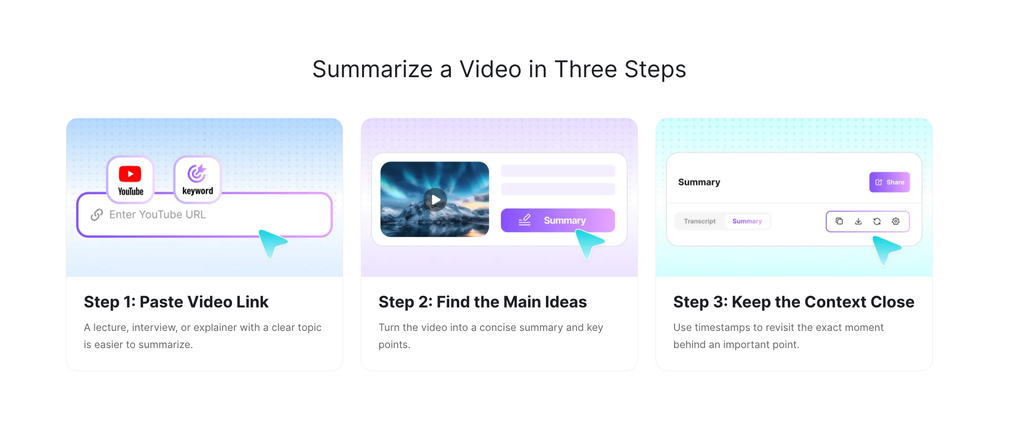
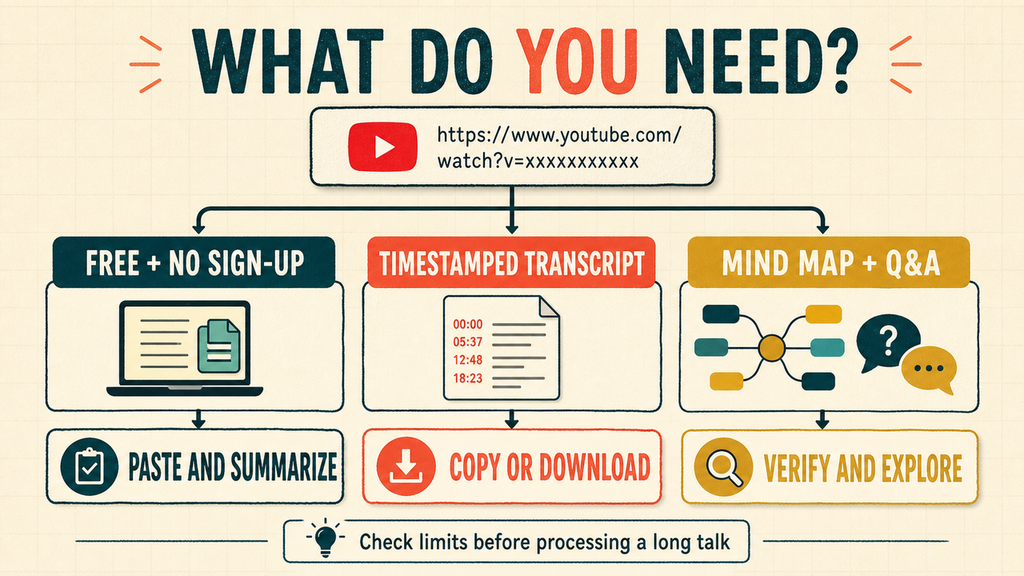
Lunote’s YouTube Summarizer is the most practical starting point when the TED Talk is available on YouTube. You can paste a public YouTube URL or search for the video by keyword, generate a concise overview and key takeaways, then return to timestamped moments when a claim needs context.
The advantage is the workflow around the summary. Lunote also provides a YouTube Transcript Generator, so the same TED video can become searchable text rather than a summary you cannot audit. The transcript can be copied or exported in TXT format, while the summary can be copied as Markdown notes and carried into a study document or knowledge base. In other words, Lunote does not require you to download the TED video before processing it; it retrieves the public YouTube content and lets you download the useful text output.
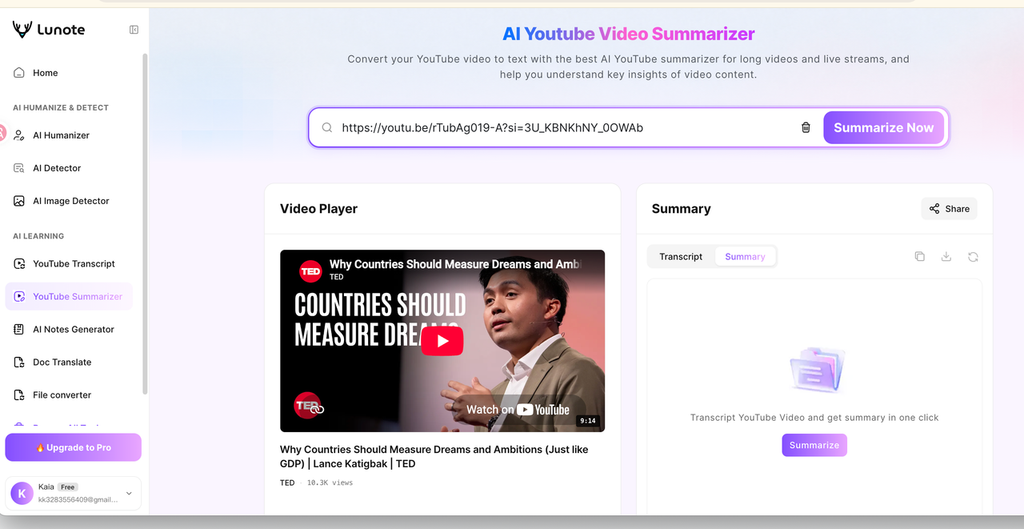
How to summarize and download a YouTube TED Talk with Lunote
- Open the TED Talk on YouTube and copy its public URL.
- Paste the link into Lunote’s YouTube Summarizer, or search for the talk by title inside the tool.
- Generate the summary and scan the central message before reading every supporting point.
- Open the timestamp attached to any important claim, number, name, or quotation and compare it with the video.
- If you need the complete spoken content, open Lunote’s YouTube Transcript tool with the same link.
- Copy or export the transcript in TXT format. Copy the structured summary as Markdown for notes, an outline, or a knowledge-base entry.
- Rename the downloaded file with the speaker, talk title, and review date so it remains traceable to the original source.
The last two steps matter. A downloaded summary is convenient, but it should not become an anonymous block of text. Keep the original TED or YouTube URL beside your notes, especially when the material will support an assignment or published article.
Features
- Public YouTube URL and keyword-search input
- Concise summary and extracted key points
- Timestamped takeaways linked to the original video
- Searchable YouTube transcript
- Transcript copying and TXT export
- Markdown-ready summary notes
- Original and translated transcript workflows
- Related note generation and Q&A tools in the same product
Pros
- Clear route from video to summary, transcript, and downloadable notes
- Timestamps reduce the time needed to verify a specific statement
- Useful for both a quick preview and a deeper transcript review
- Strong fit for YouTube-hosted TED and TEDx talks
Cons
- The cleanest workflow starts from a public YouTube link; an isolated TED.com page or restricted video may require locating the corresponding YouTube upload
- A speech-led summary cannot fully capture slides, demonstrations, facial expression, or visual humor
- Automatic transcripts can still mishear proper names, accents, numbers, and technical vocabulary
Pricing and verdict
Lunote offers free access. Its current pricing page displays an annual Pro offer at $99.99 per year and separately states that a monthly Pro trial renews at $29.99 per month. Because the page also displays “$8.00 per month” beside the annual offer—even though $99.99 divided by 12 is about $8.33—I would verify the exact checkout total and renewal term rather than rely on the headline equivalent.
I would choose Lunote when the task begins with a YouTube TED Talk and ends with notes you can download, search, and check against the source. It is less suitable when the important content is mainly visual or when the video is private, removed, age-restricted, or unavailable in your location.
2. NoteGPT — Best Free, Online, No-Sign-Up TED Study Workspace
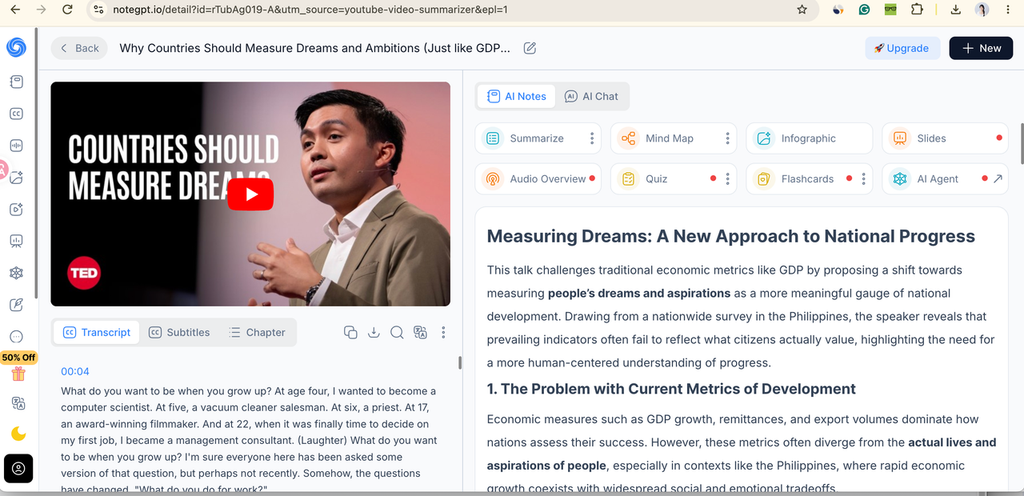
NoteGPT’s YouTube Video Summarizer is the clearest alternative for someone who wants to paste a TED YouTube link and see a substantial result before creating an account. The result page puts the video and timestamped transcript on the left and AI Notes on the right. From the same workspace, the user can open a summary, mind map, infographic, slides, audio overview, quiz, flashcards, or AI chat.
What happened in my TED Talk test
NoteGPT test result: the TED video and transcript remain visible while the generated notes appear in a separate reading panel.
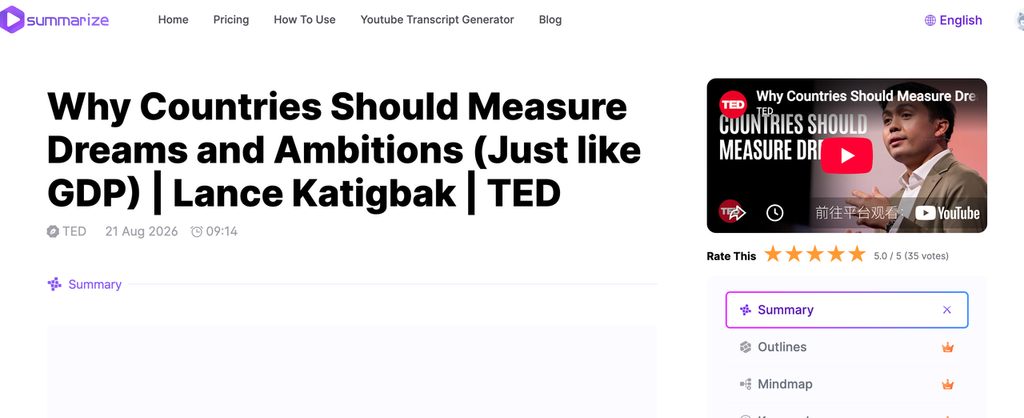
I inspected a generated result for the TED talk “Why Countries Should Measure Dreams and Ambitions (Just Like GDP)”. NoteGPT displayed the video beside a transcript beginning at 00:04, then produced a long structured summary titled “Measuring Dreams: A New Approach to National Progress.” The notes did more than list themes: they separated the argument into six parts, covered the problem with GDP-based measures, the Philippines survey, the gap between leaders and citizens, the limitations of happiness metrics, the proposed Department of Dreams, and the wider policy implications.
The result also included a comparison table and a final set of conclusions. That is useful for studying because it turns one talk into an outline a student can scan. The test also exposed the limitation of polished AI notes: specific statements—including a claimed Bhutan emigration figure, national economic status, and survey findings—look authoritative once placed inside neat headings. They still need to be checked against the transcript and original timestamp. NoteGPT organized the speaker’s claims well; it did not independently verify them.
How to use NoteGPT for a TED Talk
- Find the TED or TEDx talk on YouTube and copy the public video URL.
- Open NoteGPT’s YouTube Video Summarizer. Paste the link into the input box and leave Basic selected for the anonymous first test.
- Click Generate Summary. If the public captions are available, NoteGPT retrieves the transcript and opens a result page.
- Use Transcript for the spoken text, Subtitles for caption review, or Chapter to scan the talk’s structure. Click a timestamp to return to the matching video moment.
- Read Summarize before opening the more elaborate formats. Check whether the notes include the thesis, the strongest evidence, and the ending—not only the opening story.
- Open Mind Map when the talk has several connected arguments. Use Quiz or Flashcards for revision, but edit any item whose answer depends on an unverified number or oversimplified claim.
- Use AI Chat for a narrow question such as, “What evidence did the speaker provide for measuring dreams instead of GDP?” Ask it to cite the transcript section, then verify the answer in the video.
- Copy or download the text when the control is available. Saving work to a NoteGPT account is optional for the initial anonymous workflow but may be required for history or selected premium outputs.
Features
- Free online YouTube link input with no login stated on the product page
- Side-by-side video and timestamped transcript
- Structured AI summary with headings and key insights
- Subtitles and automatically divided chapters
- Mind maps, infographics, slides, audio overview, quizzes, and flashcards
- AI chat about the current video
- Translation and custom prompts
- Batch links and caption-free transcription on eligible higher-capacity workflows
Pros
- The most complete anonymous result I could inspect in this comparison
- Keeps transcript, video, and notes in one screen
- Better study outputs than a tool that returns only five bullets
- The tested summary preserved the talk’s main arc from the opening problem to the final policy proposal
Cons
- The number of buttons can overwhelm a user who only wants a short answer
- Beautiful structure can make an unverified claim look more certain than it is
- Advanced formats, batch processing, or videos without captions may use premium limits
- The public page makes broad “no restrictions” statements, while paid tiers and premium processing still exist; confirm the live limit for your specific video
Pricing and verdict
The basic page can be tried free without signing in. NoteGPT currently lists Pro at $9/month billed annually or $9.99 monthly, with higher Unlimited and Max tiers for more credits, batch size, file capacity, and premium transcription.
I would recommend NoteGPT to a student who wants one free TED Talk turned into both notes and revision materials. Start anonymously, verify the transcript, and pay only if the caption-free or batch workflow solves a recurring problem.
3. Decopy — Free No-Login Alternative for Multiple Output Formats
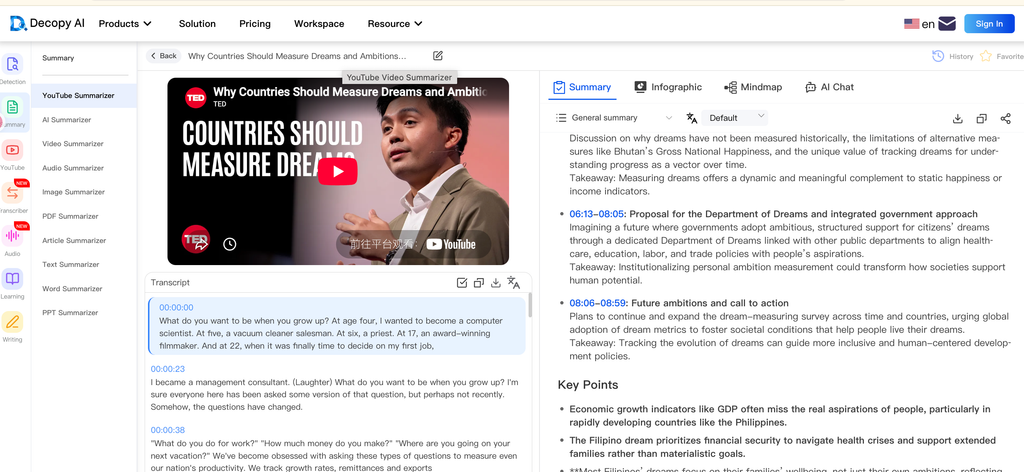
Decopy’s YouTube Video Summarizer leads with the exact low-friction promise many users want: paste a YouTube URL, summarize online, and do it without an account. Its visible controls include a general summary, AI-note, meeting-minutes, video-analysis, and film-review mode, plus language selection and a custom prompt.
How to use Decopy
- Copy the public YouTube link for the TED Talk.
- Paste it into the Video URL field.
- Select General summary for a first pass. Choose Video Analysis Summary only if you want more interpretation and are willing to check it carefully.
- Select the output language or add a custom instruction such as, “Keep the speaker’s central claim, evidence, counterarguments, and final call to action.”
- Click Summarize and review the transcript before the mind map or FAQ.
- Copy individual sections or use the advertised TXT/PDF download. Keep the original video URL and speaker name with the exported file.
Features
- No-login public input
- Transcript and timestamped summary
- Bullet points, mind map, FAQ, and custom prompts
- Eight advertised summary languages
- TXT/PDF download and section copying
- Up to 50 free YouTube summaries per day claimed by the provider
Pros
- Strong anonymous feature set
- More output control than a one-button summarizer
- Useful download options for offline study notes
Cons
- “100% free,” 50 videos per day, and accuracy descriptions are provider claims that can change
- Web-enhanced search may mix outside information with the speaker’s words; keep it off when you need a faithful talk summary
- A mind map or FAQ can add an interpretive layer that is harder to trace than a timestamped transcript
Pricing and verdict
The provider currently presents the tool as free with no sign-up and no subscription required. That makes Decopy one of the first alternatives I would try after NoteGPT. For coursework, use General Summary and the transcript; avoid treating web-enhanced additions as part of the TED Talk.
6. WayinVideo — Best Advanced Option After Free Anonymous Tools
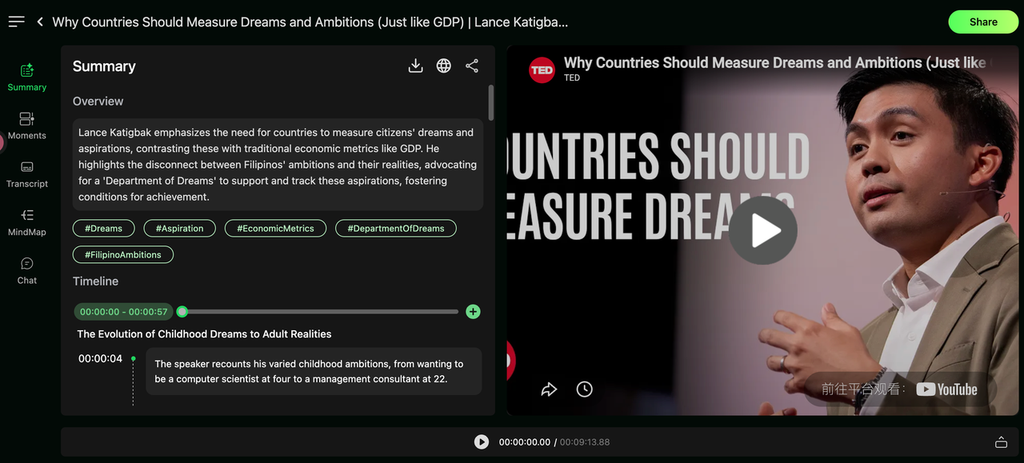
WayinVideo’s TED Talk Summarizer accepts TED, YouTube, and Vimeo links, local video files, and Google Drive uploads. It can produce a transcript, speaker labels, timestamped quotations, a mind map, and follow-up Q&A. That is powerful, but it belongs lower in a list led by free no-sign-up intent because users receive registration credits rather than a fully anonymous workflow.
How to use WayinVideo
- Create the free account and inspect the current credit balance.
- Paste the TED/YouTube link or upload the permitted file.
- Generate the summary and transcript.
- Click the timestamp behind a surprising claim.
- Ask one focused question about the speaker’s evidence.
- Export the summary or transcript before the temporary project becomes hard to find.
Pros and cons
Pros: strong timestamps, mind map, Q&A, multiple input routes, and useful export formats. Cons: registration is required, video summaries consume credits by duration, and the interface is heavier than an anonymous paste-and-read tool.
Pricing and verdict
The Free plan advertises 200 welcome credits. Video summaries use one credit per input minute and transcripts use 0.5 credit per minute. Standard is listed at $13.99 monthly or $4.99/month billed annually. Choose it when source-linked research features justify creating an account.
5. Notta — Best for Editable Transcripts
Notta’s TED Talk transcription workflow is useful when the spoken text—not the summary—is the real deliverable. It supports YouTube links and uploaded media, speaker identification, timestamped editing, and AI notes.
How to use Notta
- Create an account and import the YouTube link or permitted media file.
- Select the spoken language before transcription.
- Correct names, technical terms, dates, and numbers in the transcript.
- Generate AI notes only after the important transcript errors are fixed.
Pros and cons
Pros: editable transcript, speaker labels, search, playback, and professional transcription workflows. Cons: the free plan’s three-minute limit per conversation cannot cover a normal TED Talk, and transcript export is paid.
Pricing and verdict
Notta’s Free plan advertises 120 monthly minutes but only three minutes per conversation. Pro raises the limit to five hours per recording and 1,800 minutes per month. It is an upgrade path for serious transcript work, not the answer to “free TED Talk summarizer online, no sign up.”
6. Glasp — Best for Timestamped Highlights and Export
Glasp’s YouTube Summary is built around reading rather than only generating a detached summary. A user can paste a YouTube URL on the web, or install the extension to open Transcript, Summary, Chat, and Highlights beside the video. Glasp says the transcript, summary, and chat can work without an account; an account is needed to save highlights and build a longer-term library.
How to use Glasp
- Open the web summarizer and paste the TED YouTube URL, or install the extension if you want the panel directly on YouTube.
- Open Transcript and confirm that the captions cover the entire talk.
- Open Summary and use its timestamps to jump to the source of each key point.
- Change the summary language or prompt when needed. Do not change the model merely to chase a preferred answer; compare outputs only when an important point is missing.
- Copy the transcript or download it as TXT, SRT, or Markdown.
- Create an account only if you want to save highlights, notes, or exports to a knowledge system.
Features
- Web link input and optional browser extension
- Timestamped transcript and AI summary
- Chat and transcript highlighting
- Multiple AI-model options and custom prompts
- TXT, SRT, and Markdown transcript download
- Notion and Obsidian-oriented workflows
Pros
- No account needed for the core reading workflow according to Glasp’s current guide
- Timestamps and export make the result easier to audit and reuse
- Useful free path for a TED Talk that already has YouTube captions
Cons
- Saving highlights requires an account
- Caption-free audio transcription is limited to 30 free minutes per month
- The extension adds installation friction compared with a simple web page, although the web URL route is available
Pricing and verdict
Glasp currently states three free summaries per day. I would choose it when highlights, timestamps, or Markdown/SRT export matter more than auto-generated quizzes and slides.
7. Summarize.ing — Best for a Quick Paste-and-Submit Summary
Summarize.ing is the simplest interface here: paste the YouTube link and click Submit. The public page describes standard use as “Free Forever” and shows example output before requiring a sign-in.
How to use Summarize.ing
- Paste the TED YouTube URL into the home-page field.
- Click Submit and wait for the result page.
- Read the takeaways, then the segmented summary.
- Check key concepts and FAQs for useful review questions, not as independent facts.
- Return to the source video for any number, quotation, medical claim, or surprising conclusion.
Features
- One-field YouTube URL workflow
- Main takeaways and segmented summary
- Highlights, key concepts, keywords, and FAQs
- Mind-map output advertised
- Standard use presented as free
Pros
- Minimal setup and a visible anonymous entry point
- Good for deciding whether a talk deserves a full watch
- Several views without a complex study dashboard
Cons
- Free limits, transcript export, and no-sign-up guarantees are not explained as precisely as they are by NoteGPT, Decopy, or Glasp
- Less obvious source-verification depth
- A quick summary is not ideal for quotation-heavy research
Pricing and verdict
Use Summarize.ing as a fast screening tool. If the result matters beyond deciding whether to watch, move to a timestamped transcript workflow.
What AI TED Talk Summaries Commonly Miss
The most dangerous summary is not an obviously broken one. It is a smooth summary that quietly changes the speaker’s argument.
The story becomes the thesis
TED speakers often open with a personal story. A summarizer may devote half of its output to that memorable story even when it only sets up a broader claim. Ask: “What does the speaker want the audience to believe or do by the end?” If the answer is missing, the output is a recap, not a useful summary.
A correlation becomes a cause
A speaker may describe two things moving together, cite preliminary research, or qualify a result with “may.” Short summaries often remove those limits. Check modal words, sample sizes, dates, and whether the speaker claimed causation.
The ending disappears
Transcript compression can favor the opening because it establishes the topic and contains polished setup lines. Compare the summary with the final two minutes. If the call to action or revised conclusion is absent, the tool has not captured the complete talk.
On-screen information is lost
Transcript-first tools understand speech. They may not capture a chart, demonstration, photo, gesture, or text shown without narration. If the speaker says “as you can see here,” open that timestamp and watch the screen.
A paraphrase looks like a quotation
Quotation marks create a higher standard than a normal summary. Do not quote a summarizer’s sentence as if it were spoken verbatim. Use the transcript to locate the passage, listen to the audio, and cite the original video.
Speaker background is treated as evidence
Credentials help identify the speaker; they do not prove every claim. Keep “who said it,” “what evidence was presented,” and “whether other evidence supports it” as separate questions.
Which TED Talk Summarizer Should You Choose?
The best TED Talk summarizer is the one that gives you a clear summary without separating it from the speaker’s actual words. For most YouTube-hosted TED Talks, I would start with Lunote because it combines the video transcript, key points, and downloadable results in one workflow. NoteGPT is a strong choice when you want extra study features, while simpler tools may be enough for a quick overview without signing up.
Whichever tool you use, treat the summary as a shortcut—not a replacement for the talk. Check the transcript and timestamps before quoting the speaker, submitting an assignment, or relying on a statistic. A good AI summary should help you find the important moments faster while making it easy to return to the original context.
| Your actual task | Best starting choice | Why |
| Summarize a YouTube TED Talk and download the transcript | Lunote | Direct link-to-summary workflow plus timestamped, copyable, TXT-exportable transcript |
| Get free study notes without signing up | NoteGPT | Tested side-by-side transcript, structured notes, mind map, chat, quiz, and flashcards |
| Try several output formats anonymously | Decopy | General summary, bullets, mind map, FAQ, and download controls |
| Highlight timestamps and export a transcript | Glasp | Timestamped summary plus TXT, SRT, and Markdown transcript export |
| Get a fast first-pass overview | Summarize.ing | The simplest public paste-and-submit workflow |
| Verify important points with advanced source tools | WayinVideo | Strong source-linked transcript, quotations, mind map, and Q&A workflow |
| Produce an editable transcript for close research | Notta | Transcript-first editing, search, speaker labels, and paid export controls |
Before buying any plan, run one representative talk through the free workflow and perform this five-minute check:
- Write the central claim in your own words before reading the AI result.
- Mark one important number, name, example, and qualification in the source.
- Check whether all four survive in the generated output.
- Inspect the final two minutes of the video for a missing conclusion.
- Count the minutes needed to repair and verify the notes.
The best TED Talk summarizer is not the one that changes the most transcript text. It is the one that produces notes you can verify with the least responsible repair.
If the talk is on YouTube, start with Lunote’s YouTube Summarizer, then open the YouTube Transcript Generator when you need the complete searchable text. For a talk in another file format, Lunote Video to Text provides a related path from recorded speech to editable text. You can also compare current allowances on Lunote Pricing and find related video workflows on the Lunote Blog.
Frequently Asked Questions
What is the best AI TED Talk summarizer?
Lunote is the best overall starting point for a TED Talk hosted on YouTube because it combines video search or URL input, key-point summaries, timestamps, and a downloadable transcript workflow. NoteGPT is the strongest no-sign-up study workspace I inspected, while Decopy is a good anonymous alternative with several formats. Glasp is better when timestamped highlighting and transcript export matter.
Is there a free TED Talk video summarizer?
Yes. Lunote provides free access, while NoteGPT, Decopy, Glasp, and Summarize.ing expose online link-based workflows before a paid subscription. NoteGPT’s tested result was viewable without registration; Decopy advertises no login and up to 50 free videos per day; Glasp states three free summaries per day. These conditions can change, and caption-free transcription or saving history may require credits or an account. Test one complete TED Talk before relying on the workflow.
Can AI summarize a TED Talk from a link?
Yes, if the tool supports the link and can access its video, audio, captions, or transcript. Lunote works directly with public YouTube links. WayinVideo documents TED, YouTube, Vimeo, and other supported sources. A private, removed, age-restricted, region-blocked, or captionless video may require a permitted file upload or separate transcription step.
Can I download a YouTube TED Talk with Lunote?
Lunote can retrieve a public YouTube TED Talk for summarization and transcription without requiring you to download the video first. You can then copy the summary, copy or export the transcript as TXT, and keep timestamped notes. This is different from downloading the original copyrighted video file. If you need the video itself, use YouTube’s authorized download options and respect the creator’s rights and platform terms.
Can I summarize a TED Talk without a transcript?
Some tools can transcribe the audio before generating a summary. WayinVideo supports file uploads and video transcription, NoteGPT documents caption-free processing on eligible higher-capacity workflows, and Glasp includes 30 minutes of free audio transcription per month. Results depend on audio quality, accent, background noise, and technical vocabulary. When a transcript already exists, using and checking it usually gives you a more transparent workflow.
How do I download the transcript of a TED Talk?
If the talk is on YouTube, paste its public URL into Lunote’s YouTube Transcript Generator, generate the text, review names and important numbers, and export it as TXT. YouTube and TED may also display official transcripts for some talks. Prefer the official transcript when available, then use AI tools for summarizing and organizing it.
Can I use an AI-generated TED Talk summary in an assignment?
Use it as a study aid, not as a replacement for the original talk. Check your course’s AI policy, watch the sections you discuss, cite the TED Talk itself, and disclose AI assistance when required. Never present an AI-generated paraphrase as a direct quotation from the speaker.
Can a TED Talk summarizer generate timestamps?
Yes. Lunote, NoteGPT, Decopy, Glasp, and WayinVideo provide timestamp-connected outputs, while transcript-first tools such as Notta also support timed text. Timestamp quality still depends on the underlying transcript and source. Open the corresponding video moment before quoting or relying on a precise claim.
What is the difference between a TED Talk summarizer and a transcript generator?
A transcript generator converts the spoken words into searchable text. A summarizer selects and compresses what it considers important. Use a summary to understand the talk quickly; use the transcript to search, verify, quote, and study the complete wording. For serious work, the two are more useful together than either one alone.
Does a TED Talk summarizer understand slides and visual demonstrations?
Not always. Many tools primarily analyze captions, audio, or a transcript. Even products describing multimodal analysis can miss small chart labels, silent demonstrations, facial expression, and visual jokes. Watch the original segment whenever the argument depends on what appears on screen.