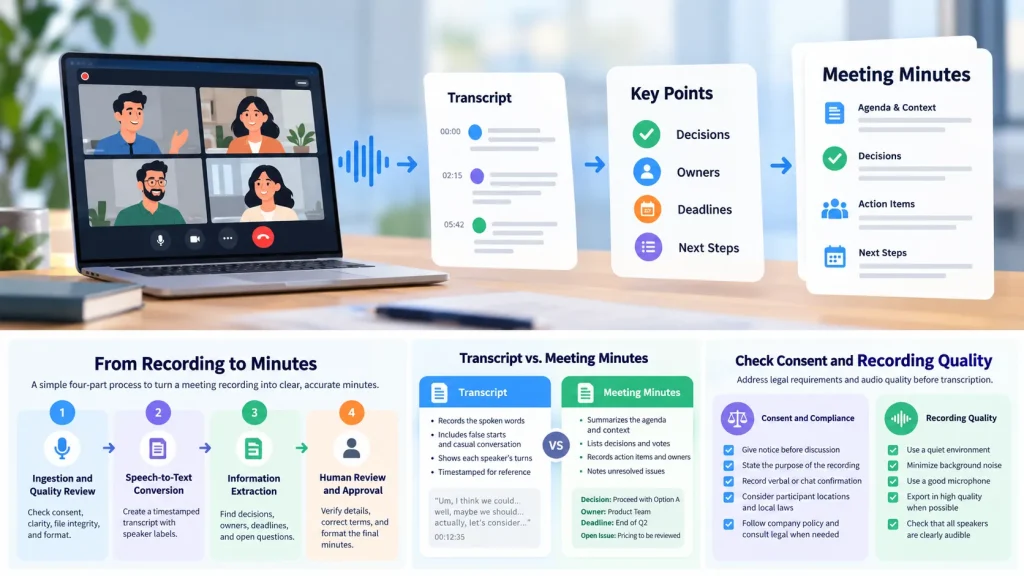
A meeting recording captures every pause, interruption, and tangent. Meeting minutes have a different job: they record decisions, owners, deadlines, and next steps. A practical workflow turns the recording into a transcript, uses that transcript to find the important points, and then checks the draft against the source.
You do not need to play the recording at normal speed and type every word. A four-part process is more efficient: check consent and recording quality, create a verbatim transcript, extract the main topics and action items, and review the result before distribution.
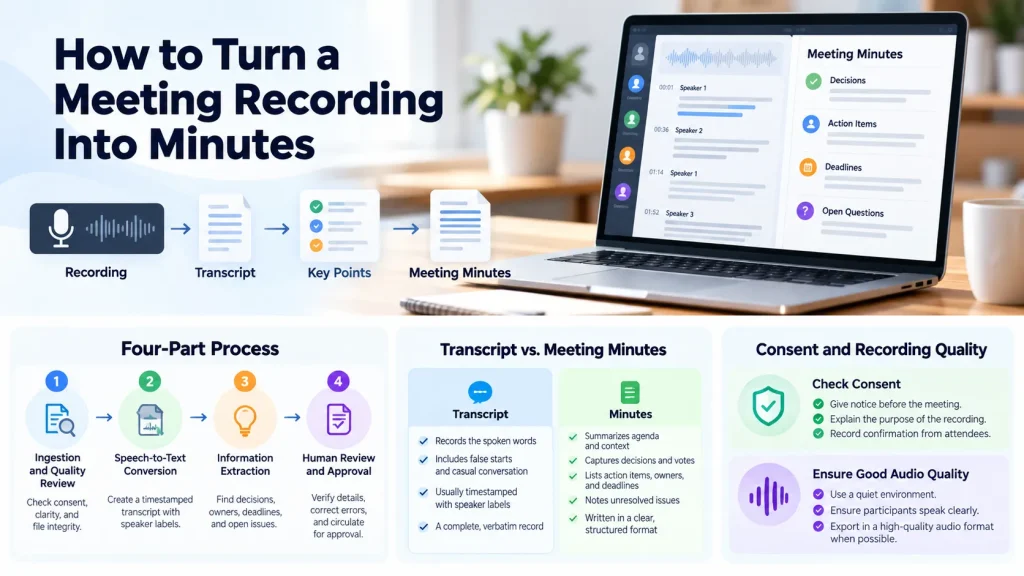
How to Turn a Meeting Recording Into Minutes
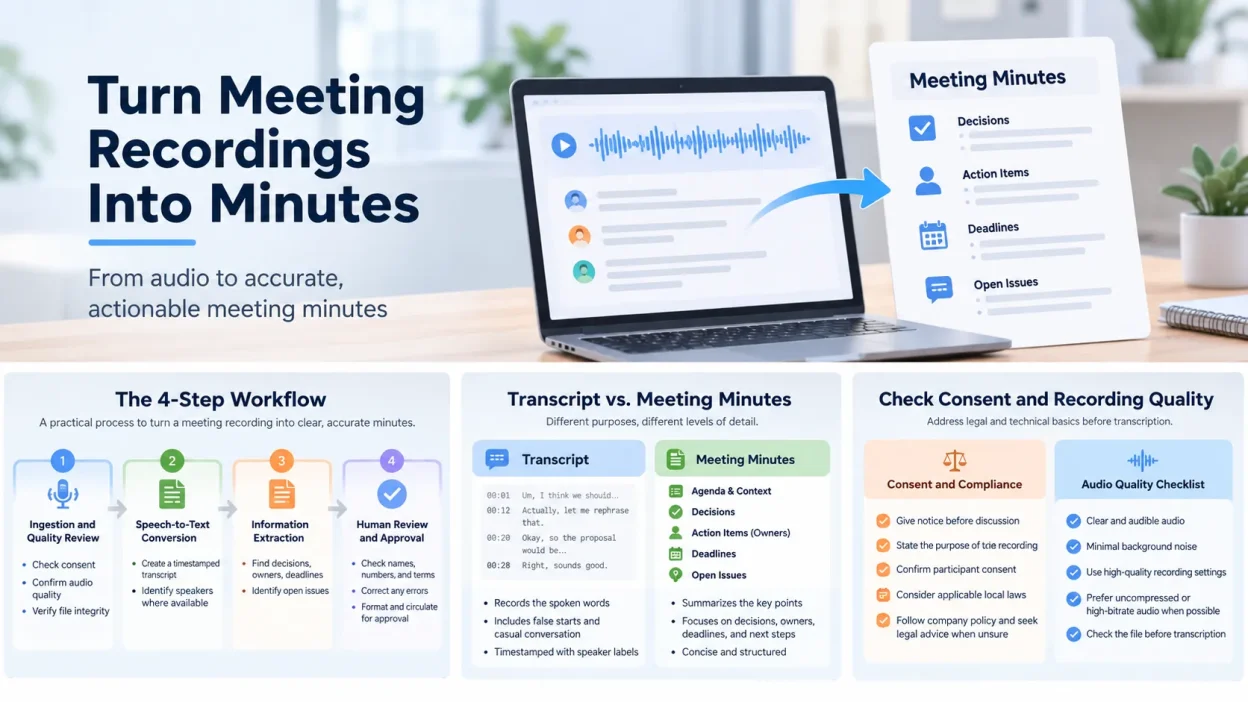
Transcripts and minutes are not the same document. A transcript records the spoken words, including false starts and casual conversation. Minutes summarize the agenda, context, decisions, votes, assignments, and unresolved issues.
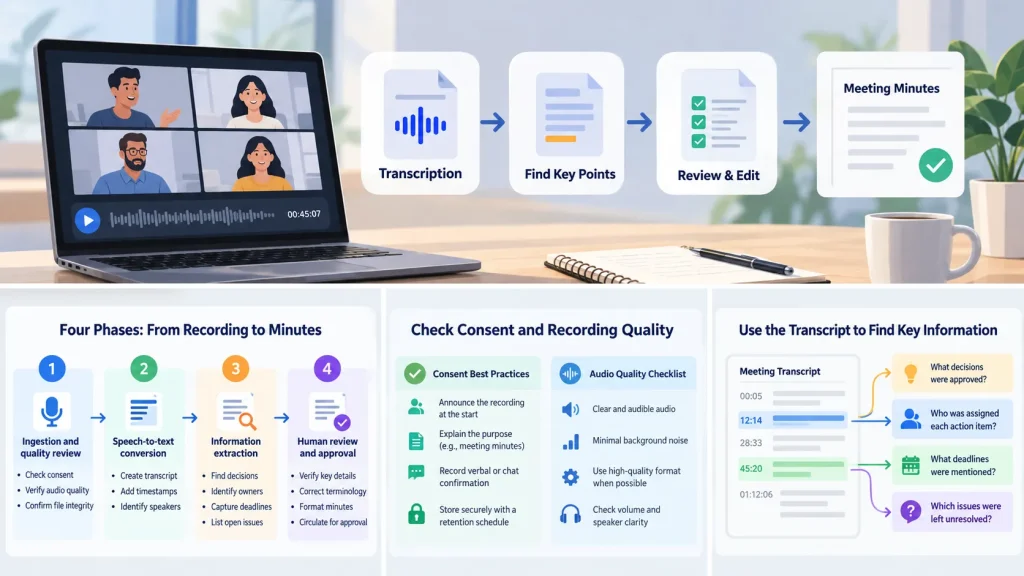
The workflow has four phases:
- Secure the audio or video from the meeting platform, phone, or recorder. Confirm that it is audible and that participants gave the required consent.
- Run the recording through speech recognition to create a timestamped transcript with speaker labels where available. Many teams transcribe MP3 to text before summarizing the meeting.
- Use a structured prompt or minutes template to identify agenda topics, decisions, owners, deadlines, and open questions.
- Check names, acronyms, numbers, and internal terms. Format the verified information in the organization’s template and circulate it for approval.
| Phase | What Happens | Evidence to Keep |
|---|---|---|
| 1. Ingestion and quality review | Check consent, clarity, file integrity, and format. | Recording notice, source file, attendee list, and meeting metadata. |
| 2. Speech-to-text conversion | Create a timestamped transcript and speaker-labeled turns where supported. | Raw transcript and source timestamps. |
| 3. Information extraction | Find decisions, open issues, owners, deadlines, and quotations that need verification. | Prompt, generated draft, and source excerpts. |
| 4. Human review and approval | Correct terminology, numbers, negations, speaker identities, and disputed decisions. | Final minutes, correction log, and approval record. |
Summarizing the audio without an intermediate transcript can make factual drift harder to detect. A written transcript gives reviewers a trail back to the point in the recording where each disputed item was discussed.
Why Lunote Can Help With Meeting Review
A basic transcription workflow stops when the audio becomes text. Someone then has to search the transcript for each decision, owner, deadline, objection, and unresolved issue.
Lunote lets you continue using the recording as a source of information. You can ask focused questions to locate the passages that need review instead of scanning the transcript from beginning to end.
After a 90-minute project meeting, you might ask:
- “What decisions were actually approved, and which items were only proposed?”
- “Who was assigned each action item, and what deadlines were mentioned?”
- “Which issues were left unresolved at the end of the meeting?”
- “Where did participants disagree about the launch date?”
- “Find every mention of Project Orion and summarize the surrounding context.”
This makes the transcript a searchable record rather than a document you must read in sequence. Check every answer against the transcript and timestamps before adding it to the official minutes.
How to Check Consent and Recording Quality
Before transcription, address consent and audio quality. Recording a conversation without the required notice or permission can create legal and compliance problems. Poor sound also reduces recognition accuracy.
Recording laws differ by jurisdiction. In the United States, states may use one-party or all-party consent rules, and the applicable rule can depend on participant locations and how the recording was made. In the European Union, a voice recording can be personal data under the GDPR. Biometric data rules may also apply when voice characteristics are processed to identify a person. For a cross-border meeting, participant locations, the purpose of processing, company policy, contracts, and local law may all matter.
A cautious process is to give notice before substantive discussion, state the purpose of the recording, document relevant participant locations, and refer uncertain cases to legal or privacy counsel. A generic “one-party consent” label is not a substitute for reviewing the relevant jurisdictions.
Useful recording practices include:
- Announce the recording at the start, even if the platform displays a recording banner.
- Explain that the audio will be used to prepare administrative meeting minutes.
- Record verbal or chat confirmation from attendees before the agenda discussion begins.
- Store the source on an encrypted company drive with a retention schedule, and delete it after approval when policy requires deletion.
After addressing consent, check the file. Recognition quality depends on signal-to-noise ratio, frequency range, and compression artifacts. If you control export settings, an uncompressed or high-bitrate source can preserve more vocal detail. In an Apple workflow, M4A transcription offers a manageable file size while retaining the recording’s dynamic range.
| Source Type | What to Check | Common Problem | Practical Response |
|---|---|---|---|
| WAV or lossless recorder export | Check the channels, clipping, and whether each participant has a separate track. | Large files may upload slowly even when the sound is excellent. | Keep the lossless master and make a smaller working copy only when needed. |
| MP3 recorder export | Listen for low-bitrate artifacts and distant speech. | Quiet consonants and overlapping voices may be harder to distinguish. | Avoid repeated conversion and use the earliest-generation file available. |
| M4A or AAC from a phone or meeting app | Confirm that cloud sync finished and the recording is complete. | A partial download or mixed participant track can resemble a transcription error. | Check the beginning, middle, and end before upload. |
| MP4 from a conferencing platform | Find out whether it contains mixed audio or separate participant tracks. | Mixed audio makes overlapping speakers harder to separate. | Keep separate tracks when available. They may be more useful than changing the codec or bitrate. |
For HVAC hum, echo, or microphone handling noise, try a high-pass filter or light noise suppression before transcription. Reducing steady low-frequency noise can help the system catch quiet words at the ends of sentences.
How to Transcribe a Meeting Recording
Once the recording is audible and compliant with the applicable rules, create the transcript. Manual transcription can take four to six hours for each hour of audio. Automatic speech recognition can reduce that time, leaving the reviewer to focus on meaning and accuracy.
- If the meeting platform produced an MP4, you can transcribe MP4 to text without extracting the audio first. Check the service’s file limits and split a multi-hour recording if necessary.
- Enable speaker diarization when available. Diarization divides the audio by voice and labels the turns as “Speaker 1,” “Speaker 2,” and so on. Without it, different viewpoints may blend into one block of text.
- Use timestamps every two or three sentences or at each speaker change. If a summary looks wrong, the timestamp lets you return to the relevant point in the recording.
Build a Meeting Vocabulary File
Before transcribing a meeting that contains client names, acronyms, product names, or codenames, make a short vocabulary list. If the service does not accept vocabulary hints, use the same list during review.
{
  "people": ["Sarah Jenkins", "Marcus Chen", "David Ross"],
  "products": ["Lunote AI", "PortalCam"],
  "acronyms": ["ARR", "MRR", "RFP", "SLA", "API"],
  "projects": ["Project Orion", "Northstar Migration"],
  "numbers_to_verify": ["Q3 target", "October 14", "$250,000"]
}
Keep the list specific to the meeting. A short list is easier to review and covers the terms most likely to be misheard.
How ASR Engines Differ for Meeting Minutes
Meeting transcription involves more than word accuracy. You also need to check speaker attribution, stability over a long recording, and whether the system adds text that the audio does not support.
| Engine or Workflow | Speaker Separation | Long-Meeting Handling | Hallucination or Drift Risk | Best Fit |
|---|---|---|---|---|
| Lunote AI | Provides speaker-aware transcription for recordings with several speakers. | Handles extended audio without requiring users to split ordinary meetings into many small files. | Names, numbers, negations, and decision status still need review. After transcription, users can ask questions, locate details, summarize selected topics, and continue examining the recording. | Teams that want transcription, searchable and editable text, speaker-aware review, and a question-and-answer layer for decisions, tasks, objections, and follow-up items. |
| OpenAI Whisper | The official transcription pipeline does not include full speaker diarization. Meeting workflows commonly add a separate diarization layer. | Whisper processes audio in 30-second model windows and joins the output across longer recordings. Context passes sequentially rather than through one multi-hour input. | Whisper can generate fluent text that the audio does not support, especially around silence, noise, or unstable segments. Its official code includes silence and hallucination-related thresholds, but the result still needs review. | Local or privacy-sensitive workflows where the team wants model control and can assemble diarization, VAD, and review steps. |
| Deepgram Nova with Diarization | Provides managed word-level speaker labels. Its current batch diarization v2 is separate from the streaming diarizer. | Runs as a managed batch or streaming API, so users do not have to manage 30-second windows or local model memory. | Speaker attribution, overlap, names, and later summaries still need checking. Labels are not ground truth when participants interrupt one another. | Production systems that want transcription and speaker labels through one managed API. |
| AssemblyAI Universal with Speaker Diarization | Provides diarization and can map generic labels to names or roles when enough context is available. | The prerecorded API supports files up to 5 GB and audio up to 10 hours, which covers most business meetings without manual splitting. | Its meeting-summary guidance notes that a later language model cannot recover a name or decision attribution that the transcript got wrong. Check the transcript and speaker boundaries before summarizing. | Meeting, interview, and call-analysis systems that need structured speaker output and later conversational analysis. |
This is not an accuracy ranking. The systems offer different features and deployment models, and vendor benchmarks cannot be compared directly with your recordings. Run the same meeting through each candidate and score word errors, speaker labels, named entities, and decision status separately.
Teams sometimes transcribe audio to text for free to test the raw result before choosing a paid workflow. Keep expectations realistic. Evaluations of conversational speech recognition report higher word error rates for spontaneous conversations with several speakers than for formal dictation. Overlapping voices, idioms, and different microphone distances all create errors that need review.
How to Use Lunote to Review a Meeting Recording
For a long meeting, you may not need to read every line before drafting. After Lunote transcribes the recording, use focused questions to find information that belongs in the minutes.
| Question | What It Checks | Next Step |
|---|---|---|
| “List every explicit decision made in this meeting.” | Separates decisions from ideas, suggestions, and brainstorming. | Read the surrounding transcript before marking an item as approved. |
| “Which action items have an owner but no deadline?” | Finds incomplete assignments that a general summary may miss. | Mark the deadline as unspecified instead of creating one. |
| “What objections were raised about the proposal?” | Preserves material disagreement rather than implying false consensus. | Confirm who raised each objection and whether it changed the decision. |
| “Find all mentions of the budget and list the amounts discussed.” | Finds figures that require manual confirmation. | Replay the audio around each amount before publication. |
| “Which topics were discussed but not resolved?” | Finds open issues that should not appear as completed decisions. | Place them in an Open or Deferred section. |
The question-and-answer interface helps with navigation and extraction. It does not replace review. The transcript and original recording remain the sources for the final minutes.
How to Extract Decisions and Action Items With AI Prompts
Once you have a timestamped transcript with speaker labels, a structured prompt can separate administrative details from general conversation. Specific boundaries work better than a broad request to summarize the meeting.
MIT experimental research on writing efficiency found that generative tools reduced completion time and improved quality for professional writing tasks. Applied to a transcript, such tools can reduce the time spent sorting discussion into categories.
For recorded presentations or strategy sessions, a video-to-notes AI tool may also process visual slides with the spoken transcript. In a text model, avoid prompts such as “summarize this meeting.” Use a format that asks separately for decisions, objections, owners, and deadlines.
Prompt for Agenda-Based Decision Extraction
You are an executive secretary documenting a formal meeting. Review the following meeting transcript and generate structured meeting minutes based strictly on the text provided.

Do not infer, assume, or extrapolate facts beyond what was explicitly stated. Follow this exact format:

1. Meeting Overview: State the date, time, and primary objective if mentioned.
2. Attendees: List all active participants identified by speaker labels or introductions.
3. Agenda Items & Discussion:
   - For each topic discussed, write a 2-3 sentence neutral summary of the context.
   - Document major differing viewpoints, noting who raised substantive objections.
4. Formal Decisions:
   - List every agreed-upon motion, approval, or consensus decision.
   - If a vote occurred, document the final tally.
5. Action Items Table:
   Create a Markdown table with columns: [Action Item Description | Assignee | Deadline | Source Timestamp].

Transcript:
[PASTE YOUR SPEAKER-LABELED TRANSCRIPT HERE]
Prompt for Action Items and Accountability
Review the attached transcript excerpt and identify all commitments, delegated tasks, and future deliverables.

For every identified commitment, provide:
- Exact Task: An imperative statement describing the deliverable.
- Responsible Party: The individual assigned (cross-reference names with Speaker tags).
- Due Date: The explicit deadline mentioned (or mark 'Unspecified' if no date was agreed).
- Dependencies: Any resources or approvals mentioned as prerequisites.
- Verification Quote: A verbatim sentence from the transcript confirming this assignment.

Ignore pleasantries, conversational tangents, and unresolved brainstorming ideas that did not result in an assigned owner.

Transcript Excerpt:
[PASTE TRANSCRIPT SEGMENT HERE]
These prompts tell the model what to include and what to leave out. The draft still needs to be checked against the source.
How to Build a Three-Minute Meeting Case Study
A synthetic transcript can illustrate an error, but a short recorded test provides better evidence of how the workflow performs.
- Record exactly 3 minutes with 3 speakers. Include a brief interruption, a conditional decision, a proper noun, a number, and one named action owner.
- Create a verified transcript manually before evaluating any ASR engine.
- Process the unchanged recording and save the raw transcript with its speaker labels and timestamps.
- Generate first-pass minutes with the prompt above without editing the output.
- Compare the result with the recording. Mark every wrong name, number, speaker label, missing negation, conditional phrase, and invented decision.
- Publish the corrected minutes beside the raw output so readers can see which errors came from recognition, summarization, or the editorial process.
Metrics for the Case Study
| Metric | What to Count | Why It Matters |
|---|---|---|
| Word Error Rate (WER) | Substitutions, deletions, and insertions against the verified transcript. | Measures general transcription accuracy but not the business effect of an error. |
| Speaker Attribution Errors | Statements assigned to the wrong participant. | One error can assign a decision or task to the wrong person. |
| Named-Entity Errors | Incorrect names, products, acronyms, projects, and organizations. | These errors can affect search, action items, and later summaries. |
| Decision-Status Errors | Changes between proposed, conditional, rejected, deferred, and approved status. | For minutes, this may matter more than raw WER because it changes the official record. |
| Unsupported Statements | Claims in the minutes that cannot be traced to the recording. | Measures hallucination in the summary. |
Keep a source timestamp beside each corrected decision in the published case study. That makes the comparison auditable.
How to Document Disagreement and Unresolved Votes
Minutes should describe the status of a decision without editorializing about the disagreement. Avoid emotional labels unless they are relevant and supported by the record.
| Situation | Risky Wording | Neutral Wording |
|---|---|---|
| No consensus | “The team argued and failed to agree.” | “The proposal was discussed. No consensus was reached, and the decision was deferred pending additional information.” |
| Material objection | “Alex opposed the plan.” | “Alex raised an objection regarding implementation cost and requested a revised estimate before approval.” |
| Conditional approval | “The plan was approved.” | “The plan received conditional approval subject to legal review and confirmation of the final budget.” |
| Split vote | “The motion passed despite disagreement.” | “The motion passed 4-2. Two members voted against the motion; no additional rationale was recorded in the minutes.” |
| Unclear vote | “The motion passed.” | “The recording does not establish a clear final vote. The outcome requires confirmation from the meeting chair.” |
Record the decision, any remaining condition, unresolved questions, and the person responsible for the next check. Do not infer consensus because the discussion ended.
How to Verify Names, Numbers, and Technical Terms
Speech recognition maps sounds to probable words. Internal codenames, brand acronyms, and specialized terms may therefore be replaced with common phrases that sound similar.
Research on ASR error propagation shows that recognition errors can pass into later summarization and alter the result. If the transcript contains the wrong engineering specification or financial figure, a summary may repeat it as fact.
Before distributing the minutes:
- Compare speaker labels with the calendar invitation. Check foreign names, similar voices, and places where first and last names may have been confused.
- Search for internal terms. For example, confirm that “the API” did not become “a PIE” and that “Project Orion” did not become “Project Iron.”
- Replay every budget figure, deadline, invoice balance, and performance metric using its timestamp.
- Check negations in important decisions. A missing “can’t” or “not” can reverse the meaning.
A short review of high-risk details can prevent transcription mistakes from becoming part of the company record.
How to Format and Distribute Meeting Minutes
Put the verified information into a document that lets readers find their assignments, decisions, and open issues quickly.
This template provides a standard structure:
================================================================================
                             FORMAL MEETING MINUTES
================================================================================

ORGANIZATION: [Company / Department Name]
MEETING TITLE: [e.g., Q3 Product Strategy Review]
DATE & TIME: [Month Day, Year | 10:00 AM - 11:30 AM EST]
RECORDING LOCATION: [Encrypted Storage Path or Media Archive ID]

1. ATTENDANCE
   - Present: [Name, Title]; [Name, Title]; [Name, Title]
   - Regrets / Absent: [Name, Title]
   - Minute Taker: [Your Name]

2. APPROVAL OF PREVIOUS MINUTES
   - Minutes of the previous meeting held on [Date] were reviewed and approved [with / without] amendments.

3. AGENDA TOPICS & EXECUTIVE SUMMARY
   -----------------------------------------------------------------------------
   Agenda Item 1: [Topic Heading]
   - Discussion: [2-3 sentences outlining the problem, context, and key inputs]
   - Decision: [Document exact agreement reached or motion passed]
   - Vote: [Unanimous / Passed (X in favor, Y opposed) / Deferred]

   Agenda Item 2: [Topic Heading]
   - Discussion: [Contextual overview of discussion points and trade-offs]
   - Decision: [Outcome reached]
   -----------------------------------------------------------------------------

4. ACTION ITEMS & ACCOUNTABILITY MATRIX
   | ID | Action Item Description | Assigned Owner | Deadline | Status |
   |:---|:------------------------|:---------------|:---------|:-------|
   | 01 | Finalize Q3 vendor RFP | Sarah Jenkins  | Oct 14   | Open   |
   | 02 | Update budget forecast  | Marcus Chen    | Oct 18   | Open   |
   | 03 | Distribute tech brief   | David Ross     | Oct 21   | Open   |

5. ADJOURNMENT & NEXT MEETING
   - Meeting adjourned at [Time] by [Meeting Chair].
   - Next scheduled meeting: [Date, Time, Location / Link].

================================================================================
Meeting-Minutes Review Prompt
MINUTES REVIEW PRESET

1. Never infer a decision from discussion alone.
2. Mark unresolved items as "Open", "Deferred", or "Requires Confirmation".
3. Preserve conditional language: if, pending, subject to, proposed, not approved.
4. Verify every person name, product name, financial figure, deadline, vote count, and negation.
5. Every action item must contain: owner, task, deadline or "Unspecified", and source timestamp.
6. If the transcript and summary conflict, replay the source before publication.
Reusable Markdown Template
# Meeting Minutes

## Meeting Information
- Date:
- Time:
- Chair:
- Minute Taker:
- Attendees:

## Decisions
| Decision | Status | Conditions | Source Timestamp |
|---|---|---|---|

## Open / Deferred Items
| Topic | Why Unresolved | Next Owner | Review Date |
|---|---|---|---|

## Action Items
| Action | Owner | Deadline | Dependency | Source Timestamp |
|---|---|---|---|---|

## Corrections / Verification Notes
-

## Approval
- Draft distributed:
- Correction deadline:
- Final approved:
Distribute the draft with a clear 48-hour correction period. Ask attendees to confirm assigned actions and challenge any inaccurate decision. After the review period, convert the approved version to PDF, archive it with the recording link, and store it according to company policy.
The complete workflow combines a usable recording, speech recognition, structured extraction, and human review. Each stage leaves evidence that helps the team trace a decision or correct the record later.
Frequently Asked Questions
Why Ask Questions About a Meeting Recording After Transcription?
A transcript is searchable, but a long meeting may still produce dozens of pages. In Lunote, focused questions can locate decisions, assignments, deadlines, objections, and specific topics. Check every answer against the transcript and recording before adding it to the official minutes.
What Is the Difference Between a Transcript and Meeting Minutes?
A transcript records the words and pauses from the call. Meeting minutes are an edited administrative record of agenda discussions, decisions, votes, and tasks assigned to named people.
Can I Generate Meeting Minutes Directly From Audio?
Some multimodal AI systems can process audio directly, but an intermediate transcript with timestamps makes the result easier to verify. Reviewers can compare disputed statements and summary claims with the exact words in the recording.
How Do I Prevent Errors in Names and Acronyms?
Create a meeting-specific vocabulary file with attendee names, products, acronyms, project codenames, and important numbers. Supply it as context if the tool supports vocabulary hints. Otherwise, use it as a review checklist and search for likely phonetic substitutions before producing the minutes.
Do I Need Consent From Everyone Before Recording a Meeting?
The answer depends on the jurisdictions and circumstances. In a cross-border meeting, participant location and purpose may matter as well as the platform or server location. Give notice before recording, document the administrative purpose, and consult legal or privacy counsel when the rule is unclear.