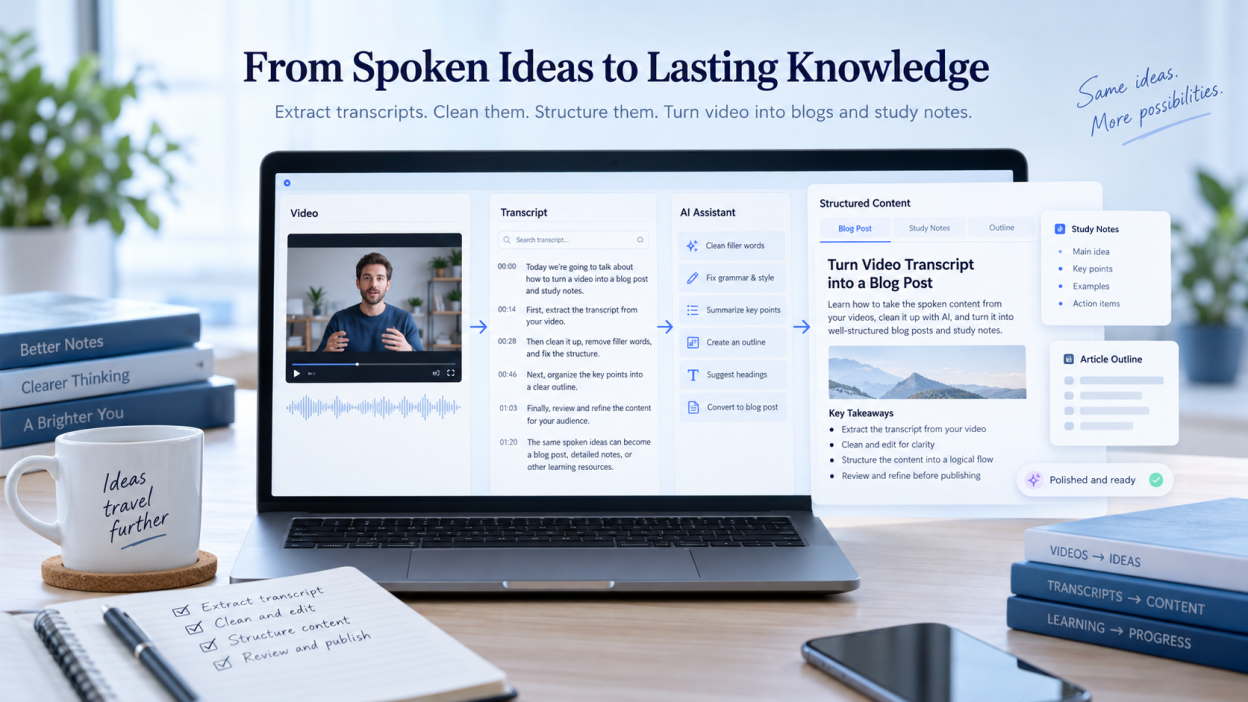
Turning spoken video into written content can draw high-value search traffic and create organized study references without starting from a blank page. A practical process has four stages: extract the transcript without timestamps, remove filler and promotional interruptions, shape the text with focused prompts, then edit and fact-check it.
For a company blog or a set of research notes, a transcript can multiply the return on every recorded video. This guide covers the steps, prompt templates, and editing workflow for turning video transcripts into articles and notes.
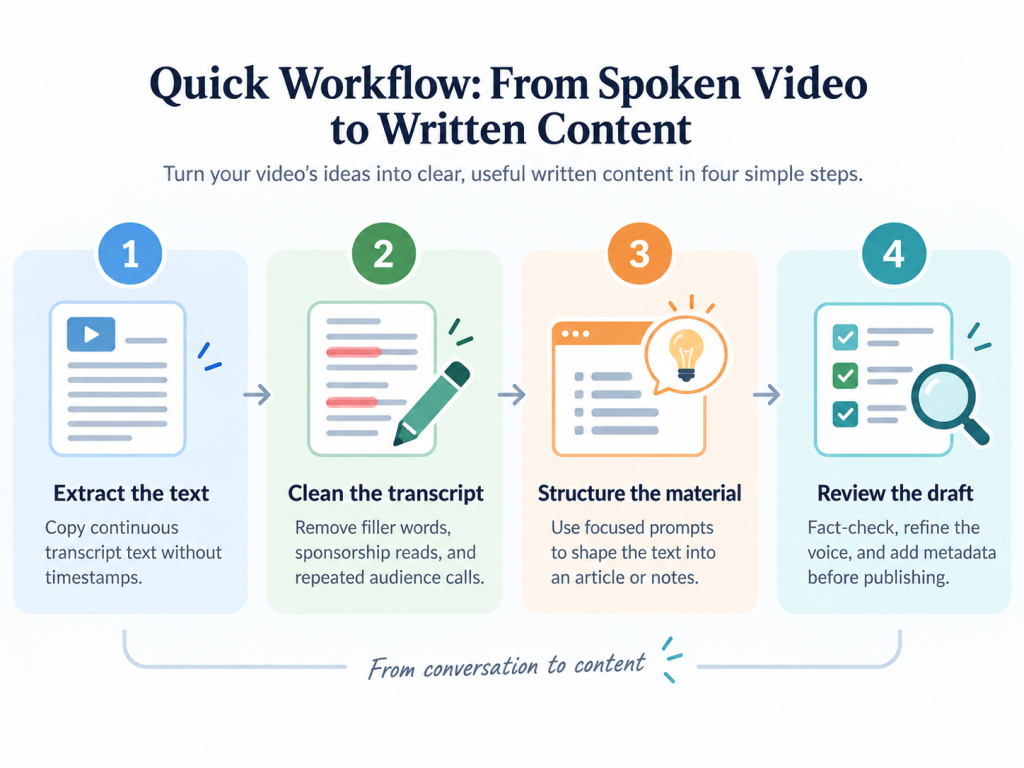
Quick Workflow to Turn Spoken Video Into Written Content
Spoken ideas need editing before they read well on the page. Without a process, the result often feels like unedited speech. These four steps provide a repeatable way to prepare a transcript for readers and search engines.
- Extract the text: Open the transcript interface, turn off timestamps, and copy the continuous text. For local video files, you can transcribe mp4 to text before formatting a draft.
- Clean the transcript: Remove filler words, stutters, sponsorship reads, and repeated calls to the audience. This gives later text generation the substantive parts of the discussion.
- Structure the material: Give the cleaned transcript to a language model with clear formatting constraints. Use different prompts for a detailed article and for short notes.
- Review the draft: Check factual claims and technical terms, improve the voice and flow, and add structured metadata before publishing.
This is more than content recycling. When marketing teams turn interviews with established industry creators into articles, the creator’s insights can attract people searching for that person. Search engines favor resources that show firsthand expertise. Publishing an industry influencer’s insights on your own site can capture searches for their name and build organic authority in Google results.
How to Extract Clean Video Transcripts Without Timestamps
You can copy a transcript from a web browser quickly if you know where the controls are. If you copy the timestamp lines as well, you may spend time removing them later. The native player includes controls for hiding them.
To copy transcript text from the desktop browser interface:
- Open the video page and scroll to the area below the player.
- Click the horizontal ellipsis or the Show transcript link in the video description box.
- Find the transcript sidebar to the right of the player or below the channel details.
- Click the three vertical dots at the top right of the transcript window.
- Select Toggle timestamps to hide time codes for the recording.
- Select the transcript from beginning to end, then copy it to the clipboard.
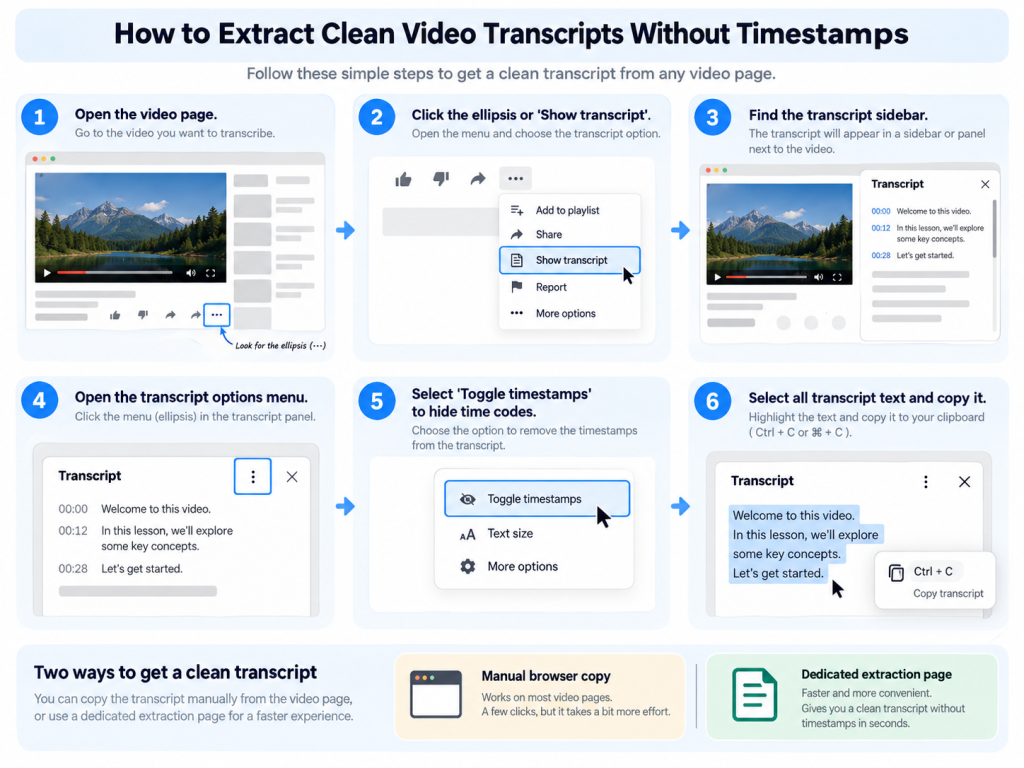
Browser Shortcuts vs. Dedicated Extraction Pages
Manual highlighting works for a ten-minute video, but continuous scrolling through an hour-long webinar can freeze a browser tab. A dedicated tool for how to copy youtube transcript text can save time in that case. These tools pull out the caption track, remove formatting artifacts, and return paragraphs that can go straight into a word processor.
Whichever method you use, choose manual closed captions over low-confidence automated speech recognition when possible. Manual captions can reduce spelling errors, especially when the speaker uses specialist software names, acronyms, or proper names.
Cleaning Raw Spoken Text Before Generating Content
Speech does not follow the same rules as edited prose. Speakers repeat themselves, wander into opening anecdotes, read sponsor messages, and use fillers such as “um,” “you know,” and “like.” Passing that speech straight to a text tool can leave structural problems in the draft.
A systematic review on speech recognition error rates found that word error rates can exceed 50% in multi-speaker or unstructured conversational audio. If speech-recognition software gets a technical term wrong, a language model may repeat the mistake and invent context around it. Removing conversational noise before prompting reduces that risk.
Use this checklist before you work with the transcript:
- [ ] Remove channel administration: Delete introductions such as “Welcome back to the channel, make sure to like and subscribe” and closing banter.
- [ ] Remove sponsor segments: Delete commercial reads, coupon codes, and sponsor messages that interrupt the topic.
- [ ] Cut tangents: Remove spontaneous jokes, side conversations, and off-topic personal stories that do not help the reader understand the subject.
- [ ] Remove repeated speech habits: Cut filler phrases, false starts, and unnecessary rhetorical transitions.
- [ ] Check technical vocabulary: Correct misheard industry terms, product names, and brands that speech-recognition tools may transcribe incorrectly.
Three minutes spent on this first pass helps the language model focus on the factual core of the conversation and makes a coherent outline easier to produce.
AI Prompts to Transform Transcripts Into Structured Blog Posts
A raw monologue or interview needs a clear prompt before it becomes a useful article. A general instruction to “turn this transcript into an article” often produces an unfocused summary that keeps the spoken cadence of the video.
An MIT empirical study on writing productivity found that generative AI assistance can reduce task-completion time while raising the average quality of professional writing. To get those benefits, specify the heading structure, target reader, formatting rules, and factual limits in the prompt.
Educational Solo Video Conversion Framework
Use this template for educational tutorials, technical walkthroughs, and monologue-style presentations:
Role: You are an expert editorial writer specializing in long-form, educational technical articles for industry professionals.

Task: Transform the provided raw video transcript into an authoritative, publication-ready blog post.

Formatting Requirements:
1. Organize the content into a compelling H1 title, a direct introductory overview, clear H2 and H3 subheadings, and a structured concluding summary.
2. Write in concise, professional paragraphs. Use active voice and concrete examples.
3. Convert procedural spoken steps into logical numbered instructions or scannable bullet points.
4. Eliminate all conversational filler, spoken repetitions, and rhetorical stage directions.
5. Do not invent external data, historical claims, or product capabilities that are absent from the transcript text.

Context Transcript:
[PASTE CLEANED TRANSCRIPT HERE]
Multi-Speaker Interview and Podcast Conversion Framework
Interviews take more editing because useful ideas are often split across back-and-forth exchanges. This prompt keeps each expert’s perspective while organizing the conversation by theme:
Role: You are a senior journalist and digital editor.

Task: Repurpose the following two-speaker interview transcript into an insightful, thematic analysis article.

Formatting Requirements:
1. Synthesize conversational exchanges into cohesive thematic sections organized under descriptive H2 headings.
2. Attribute direct insights, predictions, and unique technical arguments to the specific speaker who stated them.
3. Convert disjointed Q&A dialogue into fluid editorial prose supplemented by high-impact direct quotations.
4. Highlight key takeaways, framework definitions, and expert advice in dedicated callout lists.
5. Maintain an analytical, balanced tone throughout the piece.

Context Transcript:
[PASTE CLEANED INTERVIEW TRANSCRIPT HERE]
If a generated draft sounds stiff or repeats corporate language, use an iterative prompt to humanize ai text to vary the sentence rhythm and make the editorial voice less mechanical.
Converting Video Transcripts Into Study Notes and Presentation Outlines
Not every transcript needs to become a 2,000-word blog post. Students, corporate researchers, and workshop attendees may instead need study materials, meeting summaries, or presentation outlines from lectures and webinars.
For study resources, look for frameworks, definitions, formulas, and practical steps instead of trying to preserve the full narrative. When you work with recorded lectures, generating ai notes from youtube video recordings can help you pull out core concepts, revision tables, and flashcard prompts without listening to the recording again.
Task: Extract a comprehensive study guide and slide presentation outline from the lecture transcript below.

Required Sections:
1. Executive Summary: A 3-sentence summary of the core lecture thesis.
2. Core Concepts: A glossary defining key technical terms and methodologies introduced in the speech.
3. Framework Breakdown: Bulleted explanations of processes, historical timelines, or scientific principles mentioned.
4. Action Items & Study Questions: 5 conceptual questions that test deep comprehension of the material.
5. Slide Deck Blueprint: A 6-slide presentation outline containing slide titles, core visual concepts, and three bullet points per slide.

Transcript:
[PASTE CLEANED LECTURE TRANSCRIPT HERE]
This approach removes rhetorical storytelling and leaves a reference document that supports retention and knowledge sharing.
Dedicated Link Summarizers vs. Manual Copy-Paste AI Workflows
Creators and knowledge workers usually choose between single-click link summarizers and manual copy-paste AI workflows. The trade-off is speed versus control and depth.
With a link summarizer, you paste a video URL into a dashboard and receive a summary or mind map. A manual workflow means opening the transcript, cleaning it, and using custom prompts with an AI assistant. The differences below can help you choose an approach for a particular project.
| Evaluation Metric | Dedicated Link Summarization Tools | Manual Transcript Copy-Paste Workflows |
|---|---|---|
| Processing Speed | Fast; generates output in under thirty seconds from a link. | Moderate; requires manual navigation, extraction, and prompt execution. |
| Structural Customization | Low to moderate; limited to preset summary templates and fixed formatting outputs. | High; complete control over heading hierarchy, tone, article length, and target persona. |
| Depth of Context | Often condenses longer videos into broad, high-level summaries. | Deep; allows granular inspection of individual sections and precise topic synthesis. |
| SEO Optimization Capabilities | Minimal; rarely incorporates target search queries, custom metadata, or strategic internal link anchors. | Advanced; allows deliberate keyword placement, semantic entity inclusion, and schema formatting. |
| Ideal Use Case | Rapid personal study, lecture overviews, and preliminary video screening. | Long-form publication, authoritative brand articles, and high-impact white papers. |
For quick summaries of recorded meetings or academic lectures, an ai lecture summarizer can provide concise takeaways without manual work. If you want to rank an authoritative article in search, the manual transcript workflow gives you more control over the finished content.
Editorial Quality Control and Fact-Checking Before You Publish
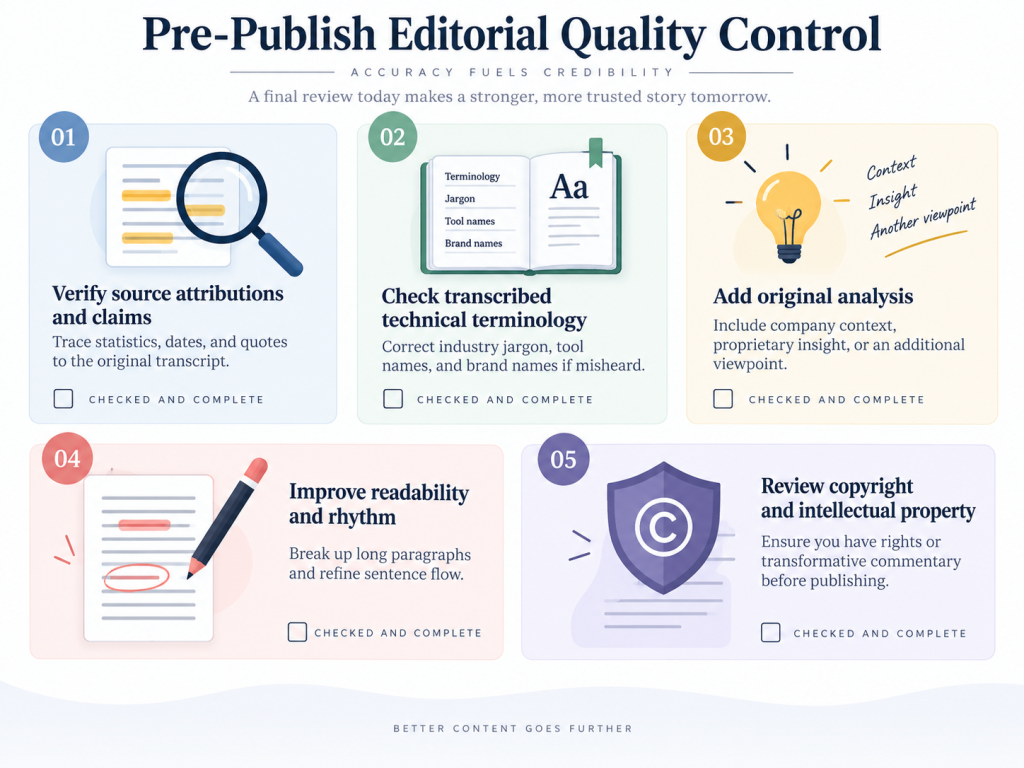
Models can organize raw text, but they cannot replace an editor’s judgment. Before publishing a repurposed article, review it carefully. Generative language models can fill factual gaps with claims that sound convincing but are not supported by the source.
A survey on language model hallucination causes and mitigation notes that neural models can produce fluent text that is still factually wrong or unsupported by source data. Publishing unverified output can damage brand credibility and search rankings.
Review every draft against these five checks:
- Verify source attributions and claims: Trace each statistic, date, and quoted claim to the original transcript. If the speaker refers to an outside study or market metric, verify the underlying figure before treating it as fact.
- Check transcribed technical terminology: Caption systems can mishear industry jargon. Check the spelling of software tools, medical concepts, and brand names.
- Add original analysis: Include company context, proprietary data, or another viewpoint. Search engines reward articles that add original information rather than merely summarizing a video.
- Improve readability and rhythm: Break up long, uniform paragraphs. Keep approximately 70% of sentences within a 15 to 20-word reading rhythm, with shorter summary sentences between them.
- Review copyright and intellectual property: You retain full publishing rights when repurposing your own video. If you adapt an interview or talk made by a third party, make sure the article is transformative commentary or get written permission from the copyright holder.
Careful editing and verification can turn a transcription exercise into a reliable article that builds topical trust with your audience.
Best Practices to Repurpose YouTube Transcripts Into Blog Posts and Notes
Repurposing YouTube transcripts can compound the value of a content strategy and save time otherwise spent drafting from scratch. With systematic extraction and careful prompts, spoken expertise can become high-ranking articles, study guides, and executive summaries.
A transcript is raw material. Its usefulness depends on the editing that follows: remove spoken filler, use focused instructions, add original analysis, and fact-check the result. Clean, scannable text can extend a video鈥檚 reach through search and internal knowledge bases.
FAQs
Can I Publish an Auto-Generated Video Transcript Directly as a Blog Post?
No. Auto-generated transcripts lack punctuation, a logical heading hierarchy, and the flow of written prose. Spoken repetition and filler words make an unedited transcript hard to read and less effective for search engine optimization.
What Is the Fastest Way to Remove Timestamps From a Long Transcript?
Open the transcript sidebar in the desktop video interface, select the three-dot menu, and choose ‘Toggle timestamps’. This removes time codes and leaves continuous text that you can select and copy.
Are There Copyright Risks When Repurposing Video Transcripts Into Articles?
Yes. Repurposing your own video recordings carries zero copyright risk. Transcribing and publishing full transcripts from third-party videos without transformative commentary, analysis, or permission can violate intellectual-property laws.
How Do I Prevent AI Tools From Hallucinating Facts When Rewriting Transcripts?
Limit the prompt to the transcript text. Tell the model not to add external claims, unverified dates, or unsupported technical specifications.